
Connecting Mobile Devices Transparently with the Customer Network in a User-Friendly Manner


(This article belongs to the Special Issue on Special Issue on Multidisciplinary Sciences and Advanced Technology 2025 and the Section Telecommunications (TEL))
Export Citations
Cite
Henrici, D. and Boose, A. (2025). Connecting Mobile Devices Transparently with the Customer Network in a User-Friendly Manner. Journal of Engineering Research and Sciences, 4(10), 1–8. https://doi.org/10.55708/js0410001
Dirk Henrici and Andreas Boose. "Connecting Mobile Devices Transparently with the Customer Network in a User-Friendly Manner." Journal of Engineering Research and Sciences 4, no. 10 (October 2025): 1–8. https://doi.org/10.55708/js0410001
D. Henrici and A. Boose, "Connecting Mobile Devices Transparently with the Customer Network in a User-Friendly Manner," Journal of Engineering Research and Sciences, vol. 4, no. 10, pp. 1–8, Oct. 2025, doi: 10.55708/js0410001.
The mobile data service in cellular networks can be more than just providing Internet access: it can connect mobile devices seamlessly and transparently to private networks like company intranets and home networks. Such a service is nowadays provided to usually larger customers based on customer-specific access point names and connecting the private data path via virtual private network (VPN) to a remote company network. A market study suggests that mobile network operators can monetize such an ability also for Small-Office / Home-Office (SOHO) customers. As also non-tech-savvy customers shall be able to connect their mobile devices to their private local networks without requiring support, it is essential to provide a plug&play solution for installation. We explore usual approaches for connecting remote devices to local networks as a basic building block. These are not only applicable in this scenario but can be used beyond it. As these approaches are not satisfactory for the purpose, we present an alternative concept based on so-called surrogate devices that are implemented based on Linux MACVLAN interfaces, policy-based routing, and network address translation. For this innovative approach, we provide technical details and a clean implementation for the wide-spread router operating system OpenWrt. Results of a friendly-user trial suggest that the goal of providing a plug&play approach for connecting remote mobile devices to a private local network is reached this way.
1. Introduction
The most important service in cellular mobile networks clearly is the data service. Being able to access the Internet in a convenient manner from everywhere has transformed our daily lives. However, mobile data can be more than mobile Internet access: mobile devices can connect to private networks like company intranets and home networks transparently without the need for any software installation on the devices.
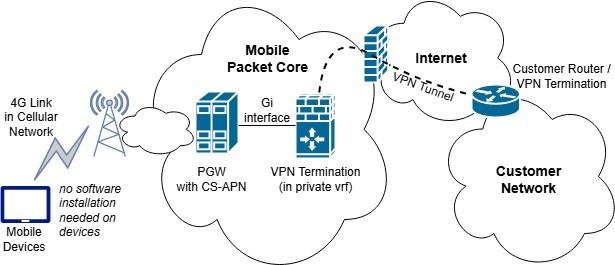
To achieve this, the data traffic of a group of devices is forwarded from the mobile packet core to the respective customer network instead of doing network address translation and forwarding to the Internet. The endpoint in the mobile packet core (GGSN in 2G, PGW in 3G/4G) is thereby selected using customer-specific access point names (CS- APNs). Via the so-called Gi interface (3GPP terminology), the data path goes to the customer – either by a private line or a virtual private network connection over the Internet. See figure 1 for illustration for the wide-spread VPN-based variant. Additional infrastructure like firewalls is usually involved in completing the setup on the mobile network operator side.
This CS-APN-based private connectivity is a standard service provided by mobile network operators to mainly larger customers and therewith best practice. A major advantage is that no software installation is required on mobile devices to obtain private connectivity, thus easing setup and avoiding software/device compatibility issues. In our paper [1], we reported on the promising findings of a market study on the demand and acceptance for such a service also for other customer groups, namely SOHO (Small Office / Home Office) customers in Germany, and explored on how to integrate this service on the customer side in a user-friendly manner.
This article builds and extends on this work. The focus is on connecting mobile devices to an existing home network or office network in a way that is appropriate even for technically inexperienced users. As the private connection from the mobile packet core to the private network is usually done via VPN over the public Internet, we first present a widespread and a less widespread approach for connecting remote devices via VPN to a local network. Based on both approaches not being ideal for the needs in our scenario, we present an innovative approach based on so-called surrogate devices in the local network.
The remainder of this work is organized as follows: In the next section, we summarize the findings of previous work in [1] and present related work and usual approaches for remote device connectivity. An introduction of the concept of using surrogate devices to make remote devices appear as local devices in a home/office network follows. Afterwards we provide technical details and implement this approach for OpenWrt-based routers in a way that integrates nicely into the OpenWrt configuration framework. Then we evaluate this approach and compare it to other options before concluding.
2. Previous and Related Work
The following sections motivate the topic further, present context, provide related work, and discuss usual approaches for connecting remote devices to a local network.
2.1. Private Connectivity for SOHOs
The following is based on the market study presented in [1]: Small-Office / Home-Office customers (SOHOs) are self-employed or only have a small staff. Many have the usual office equipment like notebooks, desktop PCs, and printers. Data is stored on these devices, network-attached storage (NAS) or small servers – depending on company size and needs. Data storage in the cloud is not widespread for company data in that customer segment due to trust issues and for avoiding problems with GDPR compliance.
Many SOHO customers want to be able to work independently of their location, not only in the office. Having their data available and accessing devices in the office / at home, e.g. smart home devices, is a practical need. Data may be stored on notebooks to have it available on the go, but other workarounds appear to be widespread: having data on USB sticks or sending emails with it to oneself. In many cases, this results in inconveniences, additional work and hassle for data synchronizations, and security issues like sensitive data in unencrypted emails.
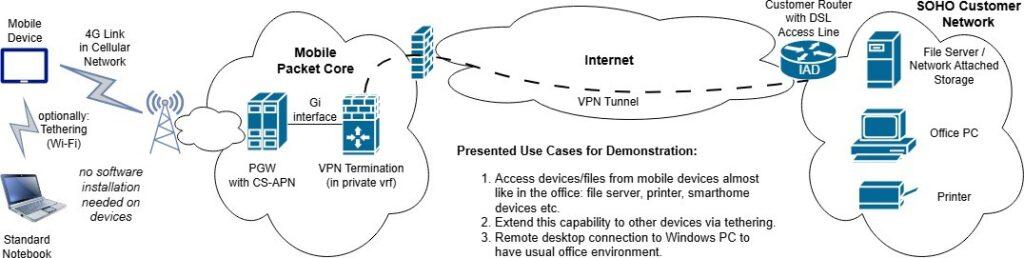
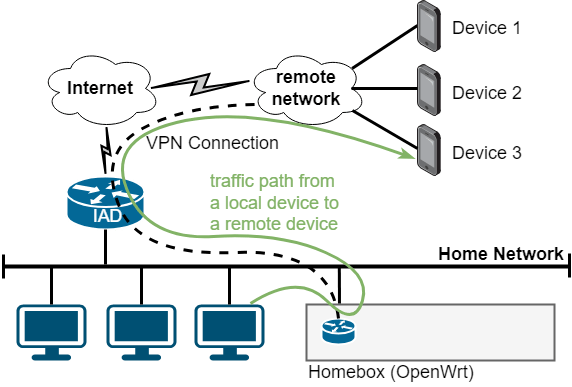
Assuming good network coverage, the ability to access one’s data and devices in the office / at home seamlessly (i.e. without using VPN software on the devices) via the mobile network is regarded as an interesting option. After a demo on the possibilities based on the setup shown in 2, the study participants expressed a willingness to pay 5 Euros per month and mobile device for such a service (on average) and stated a variety of perceived benefits that will be summarized in the following paragraphs. The study is based on focus groups where sixteen entrepreneurs of different sectors were interviewed in person by a professional market research company.
One group of perceived benefits for such a service is related to freedom: one can work flexibly and location- independently, using any mobile device connected via cellular network and using even more devices using tethering. Not needing to install any software on the mobile devices and not needing to worry of potential compatibility issues is considered a big advantage of a network-based connectivity solution. As the up-to-date data stored in the office network can be accessed and edited online, one can work as if in the office. The need for data synchronization to have data available on the move is avoided – as well as workarounds like USB sticks. There is no more risk of “forgotten data”, i.e. data that shall be accessed but that is currently not available.
Not having an additional party, i.e. another vendor/provider, involved is also considered a plus. This is a simplification, avoids needing to trust and depend on yet another party, and does not require commissioned data processing agreements for GDPR compliance. For many, it is a “good feeling” if relevant and sensitive data is stored on own premises and not stored with an external provider.
The alternative of setting up virtual private network (VPN) connectivity between mobile devices and a home/office network is beyond the technical know-how of most study participants. Not needing to install and manage VPN software on the devices is thus more practical and thus increases the target audience for a private connectivity product. For convenience reasons, not needing to manually operate VPN software for establishing connectivity is also an advantage of a seamless connectivity solution. Some of the few VPN software users said that they observed higher battery consumption with active VPN connections.
In summary, connecting groups of mobile devices privately and seamlessly to home/office networks is regarded as an interesting option by the study participants. The expressed willingness to pay for such a connectivity product makes it an interesting proposition for mobile network operators.
2.2. Related Work on Private Connectivity in Mobile Networks
The concept of Access Point Names (APNs) to select the network to connect to was introduced and standardized for cellular mobile networks as part of the 3GPP specifications in the 3GPP TS 23 series that is related to the system architecture. The original specification [2] dates back to the development of the GPRS (General Packet Radio Service) in the end of the 1990s and has been updated to refer to Data Network Names (DNNs) as the new term in the 5G era.
Private connectivity is also part of other 3GPP specifications, non-public networks in form of private networks (3GPP TS 22.261) being a widely known one. Focusing on such application areas to better compete with Wi-Fi as well as IoT applications [3], 3GPP Rel. 16 introduces “5G LAN-type service” where a “5G LAN-virtual network” [4] interconnects mobile devices and local networks. It works on layer 2 and therewith not only supports unicast but also multicast and broadcasts. Implementations exist by network equipment vendors like Huawei and ZTE. After 5G LAN demonstrations in 2019 [5], China Mobile claims to be “the first in China to use technologies such as 5G LAN … for commercial use” in a press release [6] from 2023.
To connect mobile devices with company intranets, e.g. university campus networks, Huawei offers a 5G-based solution that it calls “Mobile VPN” [7]. The approach is technically based on 5G SA’s Uplink Classifier, see [8] on the technical background.
This shows that private connectivity in cellular mobile networks is included in standards but also part of equipment vendor product portfolio. On top of that, mobile network operators provide products that build on these standards but that rely on in-house implementations or that build on offers of start-up. Telefónica Germany, the occupation of one of the authors, provides “o2 Business Secure Hub” [9] to securely connect mobile devices with company intranets. A similar offer targets IoT business. It builds upon CS-APNs but also employs an additional layer of network segmentation for scalability purposes [10]. Connectivity between mobile operator and customer is realized using IPsec VPNs or WireGuard VPNs [11]. AT&T offers in partnership with Asavie Technologies a similar product named “AccessMy- LAN” [12] to business customers. Connectivity between mobile operator and customer network is realized based on an SSL-based VPN: a software agent runs on a Windows computer. It created an SSL tunnel and masquerades the traffic of the mobile devices towards the computer’s IP address so that all their traffic appears to originate from that computer [13].
2.3. Approaches for Connecting Remote Devices via VPN
There is a vast amount of related work around connecting remote devices via Virtual Private Network (VPN) to a local network. RFC 2764 [14] describes a framework for VPNs and discusses the various types. That work being already 25 years old, lots of other ones were published over time, up to recent papers from the current year (2025 at time of writing) like [15] on taxonomy, roles, and trends.
In the following we limit ourselves to two kinds of VPN setups that can be employed in a home network or in a SOHO network. We require that all mobile devices are reachable and visible from that network so that a NAT-based approach (NAT = network address translation) with masquerading like done by Asavie [13] does not suit us. We also limit our- selves to layer 3 connectivity as that is provided by standard mobile packet cores and mobile devices. Finally, we want to work with a single VPN connection for tunneling all data traffic between packet core and customer network. In the following, we will write “home network” for the customer network to denote a small network as is also given with SOHO customers.
2.3.1. Routed Setups
The usual and straightforward approach when connecting networks and devices via VPN is a routed setup: The local network has a local network range, and the remote site or VPN road warrior users use a separate network range; the VPN gateway acts as a router between the network ranges. Such a setup is simple and clean if the VPN gateway and the home router are realized as a single device that does all the routing. Another clean variant would be if the VPN gateway were connected to the home router via a dedicated transfer network – either using a dedicated link or a dedicated VLAN. Due to the limitations of many home routers and the configuration needed, such a variant is quite unusual in practice. Another option is the setup depicted in figure 3 where the VPN is realized as a separate device in the local network.
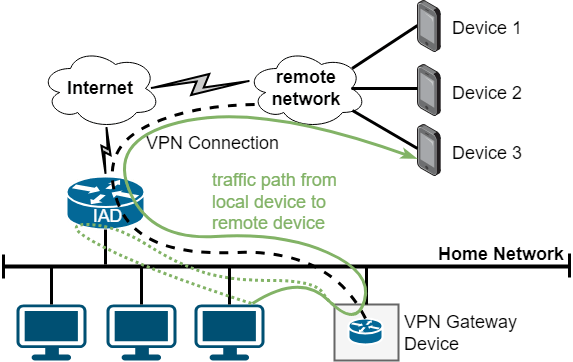
The setup in figure 3 is often desired in cases in which the home router does not have the required VPN capabilities or in cases where different functionalities shall be separated. This, however, means that there are two routers in the local network. The home router is the default gate- way. For a clean solution, all other devices need a distinct route to the VPN network range via the VPN gateway device: a route like ip route <vpn network range> via <vpn gateway>. Setting such a route on all devices is not practical so that the pragmatic option to just set this as a static route in the home router is usually chosen in practice. With this, when a device sends a packet to a VPN device, the packet is sent to the default gateway which forwards the packet to the VPN gateway due to the static route. As the default gateway detects that the packet is routed out the same interface it was received on, it emits an “ICMP Redirect” notification to the sending device to propose to take the direct path in future.
Routed setups with separated devices in the local network thus have some drawbacks: They require configuration of a static route and therewith some networking knowledge for configuration. The pragmatic variant with a static route on the home router causes many ICMP Redirect messages being emitted to the local network. Broadcast and multicast messages in the local network do not reach the VPN devices. VPN devices do not explicitly become visible in the home network, i.e. they are not shown in the device list on the home router.
2.3.2. Setups using Proxy ARP
One may attempt to avoid the drawbacks of the routed setup in certain scenarios by employing Proxy ARP (see RFC 1027). The basic idea is to use a subrange of the local network for the VPN devices. As an example, if the local net- work uses 192.168.178.0/24, one could use 192.168.178.64/28 for VPN purposes. The latter would be set on the VPN interface of the VPN gateway device as depicted in figure 3, and the remote devices would use addresses out of that subrange. The VPN gateway device has a single IP address on the interface in the local network. To make the device respond to ARP requests for remote devices, one enables the Proxy ARP feature on that interface. This way, the interface in the local network acts as a representative for all VPN devices so that other devices in the local network send traffic destined to the remote device IP addresses to the VPN gateway device. The latter then knows how to reach the respective VPN devices. Return traffic works straightforward based on regular routing and forwarding logic.
This can be an elegant option. The “wgfrontend” open- source project [16] can configure and use such a setup and can be considered a proof that the concept works well in practice. Nothing needs to be configured on the home router or on other devices in the local network to set this up cleanly. However, one needs a free subrange of IP addresses in the local network so that some networking knowledge is required and the choice of the address range is limited since it needs to be within the home network range and not in use. Proxy ARP does not assist with broadcast and multicast. VPN devices usually do not become visible in the home network as the home router usually relies on DHCP (RFC 2131) and mDNS (Multicast DNS as defined in RFC 6762) to detect devices. Note that the mentioned project targets road warriors with separate VPN connections as remote devices. However, the approach works in the same manner with a single VPN connection.
3. An innovative approach based on MACVLAN, Policy- Based Routing, and 1:1 NAT
As described in the previous sections, setups based on routing or Proxy ARP have some limitations when attempting to make remote devices appear to be local devices. Proxy ARP already works well in avoiding the need for configuring other devices in the network. We, however, want an approach that does not require any knowledge of the local network, e.g. with respect to free and used IP addresses. It also would be nice if remote devices could explicitly appear as local devices in the local network as shown in figure 4.
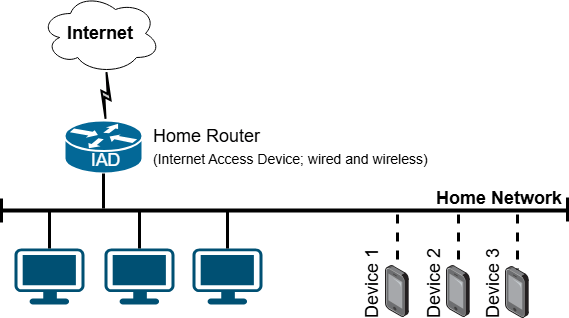
Our target is to implement a plug&play VPN gateway device (“Homebox”) that just needs to be connected to the local network without any further configuration or consideration. Especially, no configuration on the home router or on the devices in the home network shall be required. The user shall just need to attach the VPN gateway device to the home network with nothing more to do on his part. The physical setup is depicted in figure 5.
First, we require the home router to handle IP addressing without the need to change any configuration on it. The basic approach in home networks is assignment of IP addresses via DHCP (RFC 2131). Thus, we should assign IP addresses to devices via DHCP. This way, we do not need to be aware of the home router configuration and the devices appear as regular devices in the home router’s device list. To do that, we require a device in the home network for each remote device. These devices need to request their IP configuration (i.e. IP address, default gateway, DNS servers) via DHCP just like every other usual device in the home network.
Note that we do not want to closely couple the configuration in the mobile packet core with the configuration in the home network. Reasons include resilience, security, and complexity. For instance, we do not want IP address assignments to remote mobile devices to fail at times when there are connectivity issues with the VPN connections. Interacting from the mobile packet core with the home network with protocols like DHCP would also increase the attack surface. Not being able to use standard procedures like IP address assignment to mobile devices via RADIUS servers would be custom development and increase complexity of the setup. The additional complexity of potential IP address conflicts would need to be handled, too. Therefore, forwarding DHCP requests for remote devices to the home network is not a desired approach. Instead, mobile packet core and home network shall be able to operate in a completely decoupled manner.
The solution idea is to deploy “surrogate devices” in the home network – one surrogate device for each remote device that shall be connected. For this, we require a single physical device to be able to appear as multiple devices in the local network, see figure 6 for illustration. To achieve this, we employ MACVLAN interfaces [17]. This is a device type in the Linux kernel that is usually used in the context of virtualization to connect containers to the local network with high performance [18]. In this context, each container gets an interface of type “macvlan” with an own MAC address and an own IP address but that is connected to a physical parent interface. We use a MACVLAN interface without containers to create a surrogate device in the local home network for each remote device. By configuring a DHCP client to get IP configuration assigned on the surrogate device, the latter appears as a regular device in the local network without any further configuration. There are some subtleties regarding the Address Resolution Protocol (ARP) that we discuss later.
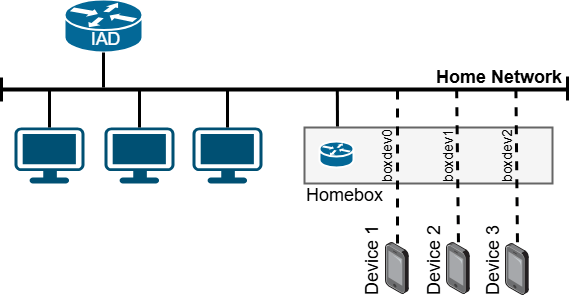
With this, we can make additional devices appear in the local network that get IP configuration assigned and that appear in the home router’s device list as regular local devices. But so far, the data traffic to these devices just reaches the VPN gateway device (Homebox), not the remote devices. To change this, we use nftables rules to map data traffic from the local IP addresses to the remote device IP addresses and vice versa. The current IP address of each surrogate device is therewith mapped to the IP address of the remote device in a 1:1 fashion. Using device names and masquerading rules, these rules can be implemented without knowing the IP addresses assigned by DHCP. Finally, we need to make sure that traffic coming from a particular remote device is sent to the local network via the correct MACVLAN interface. This is done using policy-based routing: traffic coming from a particular remote device uses a different routing table containing routes using the correct interface. Details on all this will be explained in the next section.
This approach of using surrogate devices based on MACVLAN interfaces, 1:1 NAT rules and policy-based routing allows creating a VPN gateway device that we call “Homebox”. It can be simply plugged into any existing home network and provides connectivity to remote devices without the need to perform any configuration tasks in the home network. The remote devices appear as local devices in the home network – with IP addresses assigned via DHCP as usual. For our purposes, this solution is thus superior to route-based VPNs and the Proxy ARP approach.
4. Implementation for OpenWrt
OpenWrt is an open-source operating system for routers based on Linux [19]. It can be used with a variety of hard- ware, provides a vast ecosystem of software, and has a web frontend called “LuCI” for user-friendly configuration. It is well suited to implement a VPN gateway to integrate remote devices. We already presented Bash-based configuration script for RaspberryPi hardware in [1]. But this cannot be used with OpenWrt as OpenWrt has its own configuration framework and we’d like to have a solution that is compatible with it. In addition, OpenWrt just has a Busybox-based shell implementation so that many Bash-specific shell commands are not available without installation of additional software.
Therefore, we created a configuration script [20] specifically for the current OpenWrt. We wrote for and tested with version 24.10, the current one at time of writing. The script uses OpenWrt’s configuration mechanisms and extension hooks to create a persistent configuration, i.e. one that survives reboots of the device, based on configuration data – like VPN credentials – provided in a config file. WireGuard [11] is used for creating a VPN connection towards the remote device network, in out scenario the mobile packet core. When running the script with the “-r” option, the configuration is completely removed from the OpenWrt router.
First, the script checks whether needed packages are installed and gets missing ones if needed. Besides Wire- Guard, the MACVLAN kernel module is required. If not yet present, it gets installed by calling:
opkg update
opkg install kmod-macvlan
A WireGuard interface is created by the script by issuing the following commands (values as configured in the config file):
uci set network.wghub=interface
uci set network.wghub.proto=’wireguard’ uci set network.wghub.private_key=’***’
uci add_list network.wghub.addresses=’100.127.1.2/24’ uci set network.wghub.mtu=’1392’
The network range ’100.127.1.0/24’ is used as a transfer network between the VPN interfaces in this example. Then the WireGuard interface gets the VPN terminator in the mobile packet core configured as a peer:
uci add network wireguard_wghub
uci set network.@wireguard_wghub[-1].description=’Hub’ uci set network.@wireguard_wghub[-1].public_key=’***’ uci set network.@wireguard_wghub[-1].preshared_key=***’
uci add_list network.@wireguard_wghub[-1].allowed_ips=’100.127.1.1/32’ uci add_list network.@wireguard_wghub[-1].allowed_ips=’100.64.0.0/10’ uci set network.@wireguard_wghub[-1].endpoint_host=’***’
uci set network.@wireguard_wghub[-1].endpoint_port=’51820’
uci set network.@wireguard_wghub[-1].persistent_keepalive=’25’
We use IP addresses out of the reserved CG-NAT range 100.64.0.0/10 as defined in RFC 6598 in this example. The script also creates a new firewall zone for the WireGuard interface and allows forwarding to and from the local net- work. This allows the user to manage firewall policies/rules for the data traffic traversing the VPN, e.g. using OpenWrt’s web frontend, if desired. The configuration script attempts to auto-detect the interface to the local network (“lan” in the example) based on the default route in the routing table. The default route points to the home router in the local network.
uci add firewall zone
uci set firewall.@zone[-1].name=’hub’
uci set firewall.@zone[-1].input=’ACCEPT’ uci set firewall.@zone[-1].output=’ACCEPT’ uci set firewall.@zone[-1].forward=’ACCEPT’
uci add_list firewall.@zone[-1].network=’wghub’ uci add firewall forwarding
uci set firewall.@forwarding[-1].src=’hub’ uci set firewall.@forwarding[-1].dest=’lan’ uci add firewall forwarding
uci set firewall.@forwarding[-1].src=’lan’ uci set firewall.@forwarding[-1].dest=’hub’
For each remote device, a MACVLAN interface is created and added to the local firewall zone. Configuration by DHCP is enabled and a hostname is set. This hostname is shown and registered in the home router automatically, if supported there. As an optimization, the MAC address is set with a constant prefix and the last four octets set with the octets of the IPv4 address of the remote device. This ensures that even after reconfigurations, the MAC address is deterministic so that usual home routers always assign the same IP address under normal conditions.
uci add network device
uci set network.@device[-1].type=’macvlan’ uci set network.@device[-1].ifname=’wan’ uci set network.@device[-1].mode=’bridge’ uci set network.@device[-1].name=’boxdev0’
uci set network.@device[-1].macaddr=’02:17:64:7f:00:01’ uci set network.boxdev0=interface
uci set network.boxdev0.proto=’dhcp’
uci set network.boxdev0.device=’boxdev0’
uci set network.boxdev0.hostname=’phone-main’ uci set network.boxdev0.defaultroute=’0’
uci add_list firewall.@forwarding[<lan>].network=’boxdev0’
We need to make sure that each interface answers its own ARP requests. By default, the parent interface would also answer for the MACVLAN interfaces which is not a desired behavior here. This is reconfigured using sysctl attributes in a user-defined file that gets loaded on system boot. The parent interface and a single device called “boxdev0” is configured like this in “/etc/sysctl.d/99-homebox.conf”:
net.ipv4.conf.lan.arp_ignore=1 net.ipv4.conf.boxdev0.arp_ignore=1 net.ipv4.conf.boxdev0.arp_announce=2
Configuring routing rules for policy-based routing is not possible using the OpenWrt network configuration file “/etc/config/network”. To work around this, we use a hotplug script to react on an interface being brought into the up state. Depending on the device name, we add a routing rule that matches data traffic coming from a certain remote device via the VPN interface and call a separate routing table for this traffic. The automatically created but not needed link-scope route is deleted so that the same entry for the parent interface becomes the only entry with that target in the standard table. The file “/etc/hotplug.d/iface/99- homebox” then looks as follows for a single device called “boxdev0”:
#!/bin/sh
[ “$ACTION” = ifup ] || exit 0
if [ “$INTERFACE” = “boxdev0” ]; then
ip rule add prio 30000 from 100.127.0.1 iif wghub lookup 30000
ip route add 192.168.202.0/24 dev boxdev0 proto kernel scope link table 30000 ip route add default via 192.168.202.254 dev boxdev0 onlink table 30000
ip route del 192.168.202.0/24 dev boxdev0 proto kernel scope link fi
Finally, the configuration script configures nftables with the needed IP address mappings. OpenWrt provides multiple options to add user-defined rules in addition to the ones maintained by the system and configured by the user using the web frontend. As the mappings are not related to other chains and rules, we chose the option to create an extension file. Two chains are created, one hooking into “prerouting” and another one hooking into “postrouting”. Each local MACVLAN interface address is mapped to the respective remote device IP address and vice versa. For a single device this looks in “/etc/nftables.d/90-homebox.nft” as follows:
chain homebox_dstnat {type nat hook prerouting priority dstnat – 1; policy accept; iifname “boxdev0” counter dnat ip to 100.127.0.1}
chain homebox_srcnat {type nat hook postrouting priority srcnat – 1; policy accept; oifname “boxdev0” ip saddr 100.127.0.1 counter masquerade}
Only a single remote device was shown in the example code above. However, the configuration script sup- ports up to ten remote devices. Their names and (re- mote) IP addresses as well as the WireGuard VPN con- figuration need to be provided in the configuration file in “/etc/homebox/homebox.conf”. There is no knowledge and no configuration at all needed about the parameters of the home network. This way, a configured OpenWrt gateway device may be plugged into any home network to connect one or more remote devices seamlessly and in a plug&play manner. This is a considerable advantage compared to the basic routed setup and the setup based on Proxy ARP.
5. Evaluation and Applicability
Development and initial test of the implementation was done with the x86 image of OpenWrt in a KVM/QEMU- based virtual machine on a Proxmox host running in a SOHO network. In addition, the solution was applied on real router hardware using a GL.iNet GL-B1300 device. On both platforms, everything worked well and in a stable manner. We share a comparison with other approaches and practical experiences with the service and our solution in the following subsections.
5.1. Comparison of Approaches
In this paper, we considered three approaches for implementing a VPN gateway device that can be connected to an existing home network: one based on a routed setup, one based on Proxy ARP, and an innovative approach based on surrogate devices that are implemented using MACVLAN interfaces, policy-based routing and 1:1 NAT. These three approaches are compared in table 1.
To reach the target to implement a plug&play device that can be easily installed, an approach is needed that does not require configuration work on the home router or other devices in the network. As shown in the table, only the Proxy ARP approach and the surrogate device approach adhere to this requirement. A routed setup requires setting a route at least in the home router.
Table 1: Comparison of approaches
Criteria | basic routed setup | Proxy ARP | surrogate devices |
Home router needs configuration | most often | no | no |
Other devices need configuration | yes, but workaround | no | no |
Free address subrange needed | other range | yes | no |
Remote devices appear local | no | limited | yes |
Performance | no bottleneck | no bottleneck | no bottleneck |
Plug&play possible | no | no | yes |
An additional requirement is that no configuration work on the VPN gateway device is required that goes beyond a preconfiguration done by the mobile network operator. Configuration items like VPN credentials can be configured by the network operator providing the device. But any configuration work that requires knowledge of the customer network cannot be done. The network operator cannot know what IP address range is in use in the home network in which the device will be connected to. And it cannot know which IP addresses are in use and which ones are free to use. Thus, only the routed setup and the approach based on surrogate devices can be employed in our scenario.
Only the approach based on surrogate devices makes remote devices explicitly visible in the home network since IP addresses are provided via DHCP. In a routed setup, the devices are in another network; using Proxy ARP, the devices are in the home network range, but IP addresses are not provided via DHCP.
From a performance point-of-view, all three approaches are viable. Due to the performance-limitations of embedded router hardware, the limiting factor is the VPN technology chosen. Options are IPsec, OpenVPN, WireGuard, and more. We have chosen WireGuard due to its simplicity requiring only a single UDP port for operation and its low resource consumption [11]. Therewith, the throughput of the customer’s Internet access is the bottleneck in practice, not the VPN gateway device.
All in all, the approach based on surrogate devices is the only one that can adhere to the requirements in our scenario to bring remote devices located in a mobile network transparently into the home network. The customer just needs to connect the Homebox device, thus getting a plug&play installation experience. Note that the solution works independently of the fixed network provider and the vendor of the home router. Both points are relevant in practice.
5.2. Friendly-User Trial Results
Besides the market study targeting the SOHO customer segment, we also attempted to get some first insight into whether consumer customers have use cases for a service that connects their mobile devices transparently to their home network without requiring to install and use VPN software on the mobile devices. Approximately 30 volunteering Telefónica Germany employees tested the service without prior information on what to do with it.
For the trial, we mainly used two connectivity options: on the one hand, the one depicted in figure 2 in which the home router does the VPN connectivity. For this, we provided a VPN configuration file for AVM FritzBox routers that are widely used in Germany. This configuration had to be installed by the trial participants. On the other hand, we provided low-cost OpenWrt routers from the vendor GL.iNet and manually preconfigured our surrogate device approach on them (with up to five surrogate devices per participant). These OpenWrt routers only had to be connected to the home network without any further configuration work necessary. The testing scope was limited to IPv4. Broadcast and multicast packets originating from the home network reached the mobile devices so that device discovery worked in a limited manner; there was no support in the opposite direction.
As expected, the first option was chosen only by tech- savvy users that were confident of doing configuration work in the router web interface. The second option does not have such a knowledge hurdle and could thus be used by any user. This is evidence that only providing a plug&play VPN gateway device makes the solution interesting to a broader range of customers.
The trial users often used the service for straightforward use cases as expected: accessing data and media stored in the home network when commuting or when on travel was an important one. Users with smart home devices at home used the service to access these devices without requiring cloud services as connectivity relay. However, not all device vendors supported this. Mirroring camera images taken on the smartphone to storage at home using data synchronization apps also was an application.
Interestingly, the trial users also found many use cases that were not anticipated beforehand. This is evidence that providing generic connectivity creates applications that cannot be foreseen. For instance, one user implemented a data processing pipeline to process images taken on the smartphone immediately on a server at home. One other user installed a SIP client application on his smartphone to be able to receive calls to his home fixed-net number anywhere just like being at home. Some makers started experimenting with mobile IoT applications. In summary the finding is that the more devices users have at home and the more they like to play around with technology and apps, the more they enjoy using the private connectivity service.
6. Conclusion
Connecting mobile devices in cellular networks privately to existing customer networks clearly has demand in the market, not only for larger customers but also for SOHO customers as confirmed by a presented market study. Due to the relevant use cases and advantages, the participants ex- pressed a willingness to pay five Euros per device and month. Such value-added connectivity is thus a relevant revenue opportunity for mobile network operators. A friendly-user trial indicates that the service is also interesting for cer- tain kinds of consumer customers. This should be studied further.
Plug&play installation is a prerequisite on the customer side to make a product user-friendly and to avoid the need for customer support. We presented two usual approaches for VPN connectivity, a routed approach and an approach based on Proxy ARP. As both approaches do not meet the requirements, we introduced a new approach based on MACVLAN interfaces, policy-based routing, and 1:1 NAT that makes remote devices appear as local devices in the customer network. We presented an open-source imple- mentation for OpenWrt routers and explained all relevant technical ideas and details. Evaluation in theory and in a friendly-user trial shows that the approach really provides plug&play installation and makes the use cases like secure and convenient remote access to network-attached storage available to the customers. The presented approach is not only applicable for VPN connectivity to mobile networks but can also be employed in other scenarios.
- D. Henrici and A. Boose, “Market Study and User-Friendly Enablement of 4G/5G LAN-Like Connectivity for SOHO Customers,” SmartNets 2024 – International Conference on Smart Applications, Communications and Networking, Harrisonburg, Virginia, USA, 2024, pp. 1–4, doi:10.1109/SmartNets61466.2024.10577737.
- 3rd Generation Partnership Project, “TS 23.003 – Numbering, addressing and identification”, 3GPP Release 1999, updated up to Rel. 19 in 2024/2025.
- GSMA, “5G Deterministic Networks for Industries – How 5G networks can deliver the reliable and predictable connectivity required to support key industrial processes,” available at https://www.gsma.com/solutions-and-impact/technologies/internet-of-things/wp-content/uploads/2024/02/5G-Deterministic-Network-Whitepaper.pdf, 2024.
- 3rd Generation Partnership Project, “TS 22.261 – Service requirements for the 5G system”, 3GPP Release 16, first version 2016, last update 2025.
- GSMA Future Networks, “5G LAN Support for IoT in Cloud Office,” 5G Case Study, available at https://www.gsma.com/futurenetworks/wiki/5g-lan-support-for-iot-in-cloud-office-2/, 2019.
- Mobile World Live, “China Mobile sees joint 5G industry hub development as a Win-Win,” Partner Feature, available at https://www.mobileworldlive.com/latest-stories/china-mobilesees-joint-5g-industry-hub-development-as-a-win-win/, 2023.
- P. Tomasi, “Mobile VPN enables a new nomadic workforce – Mobile VPN for Smooth Network Switching and Verticals’ Transformation,” Informa Tech, commissioned by Huawei, available at https://www.huawei.com/en/news/2023/2/mwc2023-mobilevpn-
whitepaper, 2023. - 3rd Generation Partnership Project, “TS 23.501 – System architecture for the 5G System (5GS)”, 3GPP Release 15, 2016.
- o2 Business, “o2 Business Secure Hub,” service description, available in German at https://www.o2business.de/content/dam/b2bchannels/de/pdfs-o2-business/leistungsbeschreibung/leistungsbeschreibung-o2-business-secure-hub.pdf, 2025.
- D. Henrici,W. Nicoll, J. Busch, “End-User-SpecificVirtual Global-Area Network”, EP3482536, European Patent Office, 2024.
- J. A. Donenfeld, “WireGuard: Next Generation Kernel Network Tunnel”, 24th Annual Network and Distributed System Security Symposium, The Internet Society, 2017.
- AT&T Business, “Protect confidential business data with Access-MyLAN from AT&T”, available at https://www.business.att.com/content/dam/attbusiness/briefs/accessmylan-from-att-protectsconfidential-business-data.pdf, 2022.
- P. Reeves, “accessmylan Instant APN,” Technical White Paper, available at https://silo.tips/download/technical-white-paper-14, 2017.
- B. Gleeson, A. Lin, J. Heinanen, G. Armitage, A. Malis, “RFC 2764: A Framework for IP Based Virtual Private Networks,”, The Internet Society, 2000, doi:10.17487/RFC2764.
- J. Li, B. Feng, and H. Zheng, “A survey on VPN: Taxonomy, roles, trends and future directions,” Computer Networks, vol. 257, pp. 110964, 2025, doi:10.1016/j.comnet.2024.110964.
- D. Henrici, “wgfrontend – web-based user interface for configuring WireGuard for roadwarriors”, available open source in the Python package index at https://pypi.org/project/wgfrontend/, 2024.
- https://cateee.net/lkddb/web-lkddb/MACVLAN.html, “MACVLAN support,” Linux Kernel Driver DataBase, accessed Sept. 2025.
- J. Claassen, R. Koning, and P. Grosso, “Linux containers networking: Performance and scalability of kernel modules,” NOMS 2016 – IEEE/IFIP Network Operations and Management Symposium, Istanbul, Turkey, 2016, pp. 713–717, doi:10.1109/NOMS.2016.7502883.
- A. Holt, CY. Huang, OpenWRT. In: Embedded Operating Systems. Undergraduate Topics in Computer Science. Springer, London, 2014, doi:10.1007/978-1-4471-6603-0_8.
- D. Henrici,“WireGuard Homebox Script for OpenWrt”, available open source at https://www.towalink.de/gitea/Hub/homebox/openwrt, 2025.
No related articles were found.