
Educational Applications and Comparative Analysis of Network Simulators: Protocols, Types, and Performance Evaluation

(This article belongs to the Special Issue on Special Issue on Computing, Engineering and Sciences (SI-CES 2023-24) and the Section Software Engineering – Computer Science (SEC))
Export Citations
Cite
Oikonomou, N. V. and Oikonomou, D. V. . . (2024). Educational Applications and Comparative Analysis of Network Simulators: Protocols, Types, and Performance Evaluation. Journal of Engineering Research and Sciences, 3(6), 18–32. https://doi.org/10.55708/js0306003
Nikolaos V. Oikonomou and Dimitrios V . Oikonomou. "Educational Applications and Comparative Analysis of Network Simulators: Protocols, Types, and Performance Evaluation." Journal of Engineering Research and Sciences 3, no. 6 (June 2024): 18–32. https://doi.org/10.55708/js0306003
N.V. Oikonomou and D.V... Oikonomou, "Educational Applications and Comparative Analysis of Network Simulators: Protocols, Types, and Performance Evaluation," Journal of Engineering Research and Sciences, vol. 3, no. 6, pp. 18–32, Jun. 2024, doi: 10.55708/js0306003.
This work explores the role of simulation in computer networks, discussing various network types, communication protocols, and the utilization of network simulators, with a focus on educational settings. We specifically analyze and compare five prominent network simulators: Cisco Packet Tracer, Riverbed Modeler Academic Edition, GNS3, NS-3, and Mininet. These tools are examined in terms of their functionality, user-friendliness, and suitability for educational purposes, assessing how they facilitate learning for students and trainees. The comparison extends to their operational capabilities, differences, effectiveness, and overall impact on networking education. The evaluation aims to highlight each simulator's strengths and weaknesses, providing insights into their practical applications in an academic context.
1. Introduction
In today’s interconnected world, networks encompass nearly every aspect of our global society, forming a vast web that spans the entire Earth. This extensive coverage is not just limited to geographic expansiveness but also permeates various sectors of human activity, ranging from economic operations and governmental infrastructure to personal communication and entertainment. Networks facilitate the seamless flow of information, enabling not just global connectivity but also driving advancements in technology and society. A computer network, by definition, is a system comprising both autonomous and non-autonomous computers or nodes interconnected through various means of communication. These networks are fundamental to the modern digital ecosystem, supporting an extensive array of devices beyond traditional computers, including mobile phones, printers, cameras, televisions, and even more sophisticated IoT (Internet of Things) devices like smart thermostats and security systems. The term “computer” in this context serves a formal role, recognizing any device capable of sending, receiving, and processing data as part of the network infrastructure. As networks have become ubiquitous, the functions and effectiveness of network simulations have similarly evolved to become indispensable tools in network design and management. These simulations are employed extensively across a spectrum of applications—from crafting robust architectures for large organizations and services to developing state defense mechanisms. They play a pivotal role in telecommunications, where they help in optimizing network performance and security under various scenarios without the need to physically alter the network during testing. Moreover, the role of network simulations extends into the realm of education, where they provide a practical learning experience for students and professionals alike. Through simulations, learners can explore complex network dynamics and interactions in a controlled environment, enhancing their understanding of network management, problem-solving, and strategic planning. These simulations are also crucial in the design and implementation of networks. They allow engineers and network designers to experiment with network configurations, simulate loads and attacks, and foresee how a network might behave under stress or failure conditions. The predictive capabilities of network simulations help in preempting problems and designing networks that are both resilient and scalable. In summary, the development of network technology and simulations reflects our growing dependence on digital connectivity and the continuous need for advancements in network reliability, security, and efficiency. As we look towards future innovations—such as 5G networks, enhanced broadband capabilities, and more sophisticated cybersecurity measures—the role of network simulations will only grow in importance, shaping the backbone of our digital world and ensuring that networks not only cover the Earth geographically but also meet the evolving demands of a highly connected future [1].
2. Types of Networks
Networks are divided into wired and wireless in terms of their connectivity. Wired networks are defined as those that communicate with each other through physical means, namely through networking cables. Wireless networks communicate without any transmission medium such as any cable. In terms of their coverage, we have the 3 basic categories of networks:
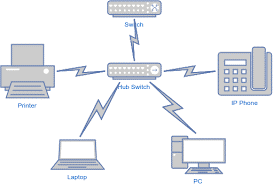
Local coverage networks that usually connect devices within the same building or nearby building infrastructure and their coverage range does not exceed a radius of 1 km.
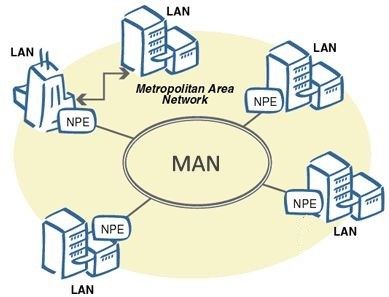
Metropolitan area networks consist of many LAN networks together and usually cover the radius of an entire area, a campus, or a city and usually reach a radius of 50km.
Wide area networks provide much larger coverage than LAN & WAN as they are the sum of the above network types, and their coverage is considered unlimited because they cover the entire Earth [2].

2.1. Network communication protocols
The most important network communication protocol as the entire internet is based on it. Divided into layers, it can manage all data transfer problems.
A basic data transfer protocol. Unlike TCP/IP, it does not have security functions but supports the transmission of information to multiple users simultaneously. It is mainly used in telecommunications (VoIP) and Online Videogames. FTP is widely used by TCP/IP for sending and receiving files. The 802-protocol family is used in LAN and MAN networks. This protocol allows the changing of IP addresses between computers to achieve accurate data transmission through the correct addressing.
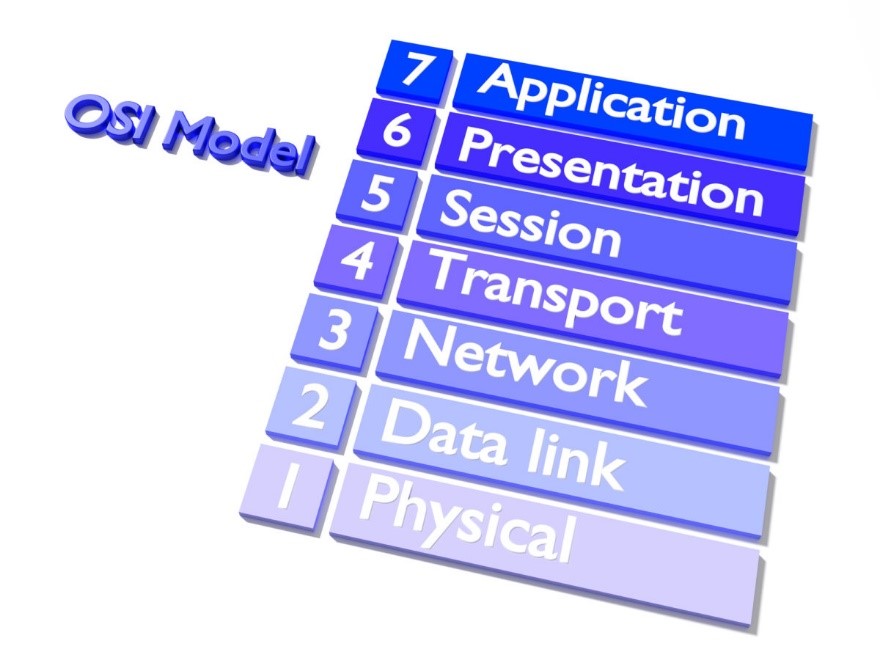
It is the initial information transmission model which started as an idea in 1970 and was formalized in 1984. It divides the entire data transfer process into 7 layers, each undertaking a separate process in the facilitation of information transfer.
3. Introduction to the Network Simulations
In this chapter, the definition of simulation, its operation, why we perform a network simulation, as well as the types of simulators with their advantages and disadvantages will be discussed. Simulation is called the study of a system with the help of a computer through a numerical experiment modeling technique. Essentially, we input (input) the data we want to study to obtain the desired output (output) results by mimicking the real-world processes or system [3].
3.1. Network Simulation Operation
In the intricate world of network simulations, the operation harmoniously blends information technology and statistical processes. This synergistic integration allows for robust data collection, analysis, and the creation of detailed visual representations such as diagrams and charts. At the heart of these operations are sophisticated programs specifically designed to execute tasks such as sampling, processing data into actionable insights, and graphical representation. These tools are crucial in turning raw data into comprehensible outcomes that can inform strategic decisions and optimize network designs [4].
3.1.1. DES (Discrete Event Simulation)
Discrete Event Simulation (DES) represents a critical methodology in the realm of simulation technologies, where the flow of time is modeled as distinct, individual events. Each event occurs at a particular instant in time and marks a change of state in the system. This approach is widely utilized across various sectors, from complex industrial settings like factories and maritime installations to more streamlined applications such as the operational dynamics of household appliances. For instance, in large-scale industrial applications, DES can simulate the logistical operations of a factory floor, the scheduling and management of maritime ports, or the traffic flow of communication in large call centers. These environments benefit from DES’s ability to model intricate systems where components interact at discrete points in time, allowing for detailed analysis of each interaction. On a smaller scale, DES can be applied to everyday applications such as the adaptive control of a radiator’s fan speed based on temperature fluctuations or the intensity adjustments of a lamp in response to changes in ambient lighting conditions. These simulations help in refining product designs to enhance functionality and user experience [5].
3.1.2. ABS (Agent-Based Simulation)
Agent-Based Simulations (ABS) provide a dynamic framework where agents, autonomous decision-making entities with defined behaviors, interact within a simulated environment. This type of simulation is particularly suited to scenarios where complex interactions among agents lead to emergent behaviors and outcomes. ABS is extensively used in fields such as healthcare, where it can model the spread of diseases within a population, or in economics, where it can simulate market dynamics and consumer behaviors. Agents in these simulations are designed to mimic real-world behaviors, making ABS an excellent tool for studying social systems and organizational structures. For example, in health sector simulations, agents could represent individuals with varying susceptibility to a disease, allowing researchers to study the impacts of interventions on disease spread [6].
3.1.3. CS (Continuous Simulation)
Continuous Simulation (CS) deals with systems characterized by continuous state changes over time, modeled through differential equations. Unlike DES where changes occur at discrete intervals, CS provides a smooth and continuous description of system dynamics. This type of simulation is indispensable in fields like environmental science for studying climate change impacts or in engineering for assessing the stress and strain on materials over time. CS is particularly effective for simulations that require tracking of variables that change incrementally across every point in time, such as the growth of a population of animals or the dispersion of pollutants in an ecosystem. These simulations are crucial for long-term planning and forecasting in environmental management and urban planning [7].
3.1.4. HS (Hybrid Simulation)
Hybrid Simulations combine the features of both discrete and continuous simulations. This blend allows for the modeling of systems where both continuous and discrete processes exist simultaneously. For example, a hybrid simulation might model a manufacturing process (a continuous flow of materials) alongside the maintenance schedules of the machinery (discrete events) [8].
3.1.4.1. Continuous Processes
Continuous simulations are used to model systems that change in a smooth, continuous manner over time. In the context of network simulations, this might involve the continuous flow of data through network channels, where parameters like bandwidth, latency, and error rates are modeled as continuous variables.
3.1.4.2. Discrete Events
Discrete event simulations, on the other hand, are used to model systems where changes occur at distinct points in time. In network simulations, this could involve modeling events such as packet arrivals, queue formations, and protocol state transitions.
3.1.4.3. Integration of Continuous and Discrete Models
Hybrid simulations integrate these two approaches to provide a more comprehensive modeling framework. For instance, in a network simulation, continuous models can simulate the overall data flow, while discrete models can handle specific events like packet drops or node failures.
3.1.4.4. Advantages of Hybrid Simulation
The primary advantage of hybrid simulation is its ability to capture the dynamic interactions between continuous processes and discrete events. This approach can provide more accurate and detailed insights into the behavior of complex systems, which is particularly useful in scenarios where both types of processes are significant.
Hybrid simulation techniques are increasingly used in various fields, including manufacturing, logistics, healthcare, and telecommunications. They offer a powerful tool for analyzing and optimizing systems where continuous and discrete dynamics interact.
3.2. Advantages/Disadvantages
The adoption of simulation technologies comes with its set of advantages and challenges. Below, we explore these aspects in detail, providing a comprehensive understanding of the potential benefits and limitations. [9].
3.2.1. Advantages
3.2.1.1. Risk-Free Testing Environment
3.2.1.1.1. Scenario Modeling
The foremost advantage of using simulations is their ability to model and test every conceivable scenario for network implementation in a risk-free, virtual environment. This allows for the examination of network behavior under various conditions without the risk of disrupting actual network operations.
3.2.1.1.2. Cost-Efficiency
Simulations help in identifying the most efficient, cost-effective, and robust network configurations. This pre-implementation testing can save significant costs associated with trial-and-error approaches in real-world deployments.
3.2.1.1.3. Safety
By testing network changes in a simulated environment, potential issues can be identified and resolved before they affect live systems, ensuring network stability and reliability.
3.2.1.2. Flexibility and Scalability
3.2.1.2.1. Scalable Models
Simulation tools can model networks of various sizes and complexities, from small local networks to large-scale global infrastructures. This scalability allows for comprehensive analysis of network performance and potential bottlenecks.
3.2.1.2.2. Customizable Scenarios
Users can customize simulations to match specific requirements, such as testing new protocols, evaluating network upgrades, or assessing security vulnerabilities.
3.2.1.3. Enhanced Understanding and Learning:
3.2.1.3.1. Educational Value
Simulation tools provide a valuable educational resource, allowing students and professionals to visualize and interact with complex network topologies and protocols. This hands-on experience enhances understanding and facilitates learning.
3.2.1.3.2. Predictive Analysis
By simulating future network scenarios, organizations can proactively identify potential issues and implement preventive measures, enhancing overall network resilience.
3.2.1.4. Efficient Resource Allocation:
3.2.1.4.1. Optimization
Simulations can identify the optimal allocation of network resources, such as bandwidth and hardware, ensuring efficient utilization and minimizing wastage.
3.2.1.4.2. Performance Evaluation
They enable the evaluation of network performance under different configurations, helping in making informed decisions about resource investments and upgrades.
3.2.2. Disadvantages
3.2.2.1. Resource-Intensive Development
3.2.2.1.1. High Costs
The development and operation of advanced network simulators are resource-intensive, requiring significant investment in both computational resources and expert human capital. High-performance computing infrastructure and skilled personnel are essential for creating and managing detailed simulation models.
3.2.2.1.2. Complex Setup
Setting up simulation environments can be complex and time-consuming, particularly for large-scale or highly detailed simulations.
3.2.2.2. Limitations in Realism:
3.2.2.2.1. Approximation of Reality
Despite advances in simulation technology, the inherent unpredictability of real-world environments means that simulations, while highly indicative, cannot completely replicate all real-world variables. Factors such as human behavior, environmental changes, and unexpected network traffic patterns may not be fully captured.
3.2.2.2.2. Validation Required
Consequently, results from simulations should be interpreted as approximations. While they provide valuable insights, these results require careful consideration and validation against real-world data and experiences to ensure their accuracy and applicability.
3.2.2.3. Potential for Over-Reliance:
3.2.2.3.1. Overconfidence in Simulations
There is a risk that organizations may become overly reliant on simulation results, potentially overlooking the importance of real-world testing and validation. Simulations should complement, not replace, empirical testing and field trials.
3.2.2.3.2. Static Models
Simulation models can become outdated if they are not regularly updated to reflect changes in technology, network configurations, and usage patterns. Continuous maintenance is necessary to ensure simulations remain relevant and accurate.
3.2.2.4. Technical Challenges
3.2.2.4.1. Modeling Complexity
Accurately modeling complex networks and protocols can be technically challenging. Simplifications and assumptions made during the modeling process can impact the accuracy of simulation results.
Debugging and Troubleshooting: Identifying and resolving issues within simulation models can be difficult, particularly when dealing with intricate network interactions and behaviors.
In conclusion, while simulation technologies offer numerous advantages, including risk-free testing, cost-efficiency, and enhanced learning opportunities, they also present challenges such as high development costs, limitations in realism, and potential over-reliance. To maximize the benefits of simulations, it is crucial to balance their use with real-world testing and continuously validate simulation results against actual network performance. By doing so, organizations can leverage simulations to improve network design, optimize resource allocation, and enhance overall network resilience.
4. Network Simulation Tools
In this section, we will explore some of the most prevalent network simulation programs available today. These tools are crucial for modeling, analyzing, and optimizing network performance in various environments, ranging from educational settings to complex commercial deployments [10] , [11].
4.1. Opnet (Optical Micro-Networks)
Opnet, now known as Riverbed Modeler, is a discrete event simulation (DES) tool with graphical user interface (GUI) support. It is widely regarded as one of the most comprehensive and powerful network simulators available in the commercial market. Opnet’s architecture allows it to be used in several sectors due to its ability to model a wide range of network components and behaviors.
4.1.1. Wireless Communications
Opnet can simulate various wireless technologies, including Wi-Fi, cellular networks, and satellite communications. It provides detailed models for radio frequency (RF) propagation, interference, and mobility patterns, enabling accurate performance analysis of wireless networks.
4.1.2. Wired Communications
The tool supports the simulation of traditional wired networks, including Ethernet, fiber optics, and other physical media. Users can model network topologies, link failures, and traffic patterns to study network performance under different conditions.
4.1.3. Protocols
Opnet includes a vast library of protocol models, covering all layers of the OSI model. This allows users to simulate the behavior of routing protocols, transport protocols (e.g., TCP, UDP), and application-layer protocols, providing insights into protocol interactions and performance.
4.1.4. Queues
The simulator offers detailed queue models, enabling the analysis of queuing behavior in network devices such as routers and switches. This helps in understanding delays, jitter, and packet loss under various traffic loads.
4.1.5. Microprocessors & Complex Hardware Types
Opnet can model the internal behavior of network devices, including the processing power of microprocessors and the performance of complex hardware components. This capability is essential for studying the impact of hardware configurations on network performance [12].
4.2. Cisco Packet Tracer
Cisco Packet Tracer is Cisco’s primary network simulation and visualization tool, widely used in educational institutions, academies, and organizations for training and certification purposes. It provides a robust platform for learning, teaching, and testing network concepts and configurations.
4.2.1. Learning and Teaching
Packet Tracer is an integral part of Cisco’s Networking Academy curriculum. It allows students to practice network configuration and troubleshooting in a virtual environment, reinforcing theoretical knowledge with hands-on experience.
4.2.2. Testing and Certifications
The tool supports the preparation for Cisco certification exams (e.g., CCNA, CCNP) by providing realistic simulation scenarios that mirror those encountered in real-world networks. This practical training is crucial for developing the skills required to manage and configure Cisco networks.
4.2.3. Features
Packet Tracer includes a variety of features, such as real-time and simulation modes, allowing users to visualize network behavior and performance. It supports a wide range of Cisco devices and protocols, enabling the simulation of complex network topologies and interactions.
4.2.4. Collaboration
The tool offers collaborative features, allowing multiple users to work on the same network simulation simultaneously. This is particularly useful in classroom settings, where instructors and students can interact and share insights in real-time [13].
4.3. GNS3 (Graphical Network Simulator-3)
GNS3 is an open-source network simulator that allows the simulation of complex networks using real network hardware images and virtualization technologies. It is highly popular among network professionals and enthusiasts for its flexibility and powerful features.
4.3.1. Real Hardware Emulation
Unlike other simulators that rely on abstract models, GNS3 uses real Cisco IOS, Juniper Junos, and other network operating system images to emulate actual hardware devices. This provides a highly realistic simulation environment.
4.3.2. Integration with Virtual Machines
GNS3 can integrate with VirtualBox, VMware, and other virtualization platforms, allowing the simulation of virtual machines alongside network devices. This is useful for simulating end-to-end network scenarios, including client-server interactions and multi-tier applications.
4.3.3. Extensibility
The simulator supports a wide range of plugins and third-party tools, such as Wireshark for packet capture and analysis. This extensibility makes GNS3 a versatile tool for network design, testing, and troubleshooting.
4.3.4. Community Support
GNS3 has a vibrant community of users and contributors who provide support, share configurations, and develop new features. This community-driven approach ensures continuous improvement and adaptation to emerging networking technologies. [14]
4.4. NS-3 (Network Simulator 3)
NS-3 is an open-source discrete-event network simulator designed for research and educational purposes. It provides a detailed simulation environment for networking protocols and internet systems.
4.4.1. Research Focus
NS-3 is widely used in academic and research settings to study the performance and behavior of networking protocols. It supports the simulation of a wide range of network types, including wired, wireless, and satellite networks.
4.4.2. Realism and Accuracy
The simulator offers high fidelity models that closely mimic real-world network behavior. This accuracy makes it suitable for validating theoretical models and conducting performance evaluations.
Programming Interface: NS-3 provides a flexible programming interface, allowing users to extend and customize the simulator to meet specific research needs. It supports C++ and Python, making it accessible to a broad range of users.
4.4.3. Visualization Tools
While NS-3 itself is focused on the simulation engine, it integrates with various visualization tools, such as NetAnim and PyViz, to provide graphical representations of network topologies and traffic flows [15].
4.5. Mininet
Mininet is a network emulator that creates a realistic virtual network on a single machine. It is widely used for developing, testing, and demonstrating software-defined networking (SDN) applications.
4.5.1. SDN Focus
Mininet is specifically designed to support SDN and OpenFlow. It allows users to create and experiment with SDN topologies, controllers, and applications, making it an essential tool for SDN research and development.
4.5.2. Rapid Prototyping
The emulator can quickly instantiate network topologies, making it ideal for rapid prototyping and testing. Users can simulate large networks with hundreds of nodes using minimal resources.
4.5.3. Integration with Real Networks
Mininet can integrate with physical networks, enabling hybrid environments where virtual and real devices interact. This feature is valuable for testing SDN applications in realistic settings.
4.5.4. Educational Use
Mininet is widely used in educational settings to teach SDN concepts and practices. Its ease of use and flexibility make it a popular choice for classroom labs and assignments [16].
4.6. Presentation of Simulators
4.6.1. Analysis of Cisco Packet Tracer
Cisco Packet Tracer is an innovative educational tool that allows trainees to create networks with nearly unlimited capabilities, using a wide range of devices. This encourages diagnostics and troubleshooting, enhancing the learning experience.
From the Educator’s Perspective: Packet Tracer allows the teaching of network device functions that operate in the background, visible in everyday life. For instance, it can simulate the operation of a router, showing what happens from the moment a user enters a password until the router grants access to the user’s device. The simulation capabilities simplify the learning process by providing tables, diagrams, and visual representations of internal functions, such as dynamic data transfers. The simulation function reduces presentation time by replacing tables and static slides with real-time visual effects.
4.6.2. Benefits for Educators
- Provides visual displays of complex technologies with configuration capability.
- Allows customized, guided activities with immediate feedback.
- Facilitates various learning activities like lectures, lab activities, homework, assessments, and games.
- Supports network design, troubleshooting, modeling tasks, and case studies.
- Enables visualization, movement, and detailed modeling for exploration, research, and experimentation.
- Encourages learning outside the classroom.
- Supports social learning, collaboration, and healthy competition.
- Covers most protocols and technologies taught in Cisco seminars and courses.
From the Student-Trainee Perspective: Packet Tracer offers a practical way of learning through simulation, allowing better opportunities to gain practical skills and knowledge when working with real equipment. Trainees gain faster experience through troubleshooting in simulation and real-world scenarios, building confidence and leading to a more productive workforce.
4.6.3. Workspaces
4.6.3.1.1. Logical Workspace
Users can create logical network topologies by placing, connecting, and grouping virtual network devices.
4.6.3.1.2. Physical Workspace
Provides a graphic-physical dimension of the logical network, showing how devices like routers, switches, and mainframes would appear in a real environment. It also includes geographical representations of networks, including cities, buildings, and cables.
4.6.4. Modes of Operation
4.6.4.1. Real-Time Mode
The network and its devices behave like real devices, offering immediate real-time response for all networks and subnets.
4.6.4.2. Simulation Mode
Allows users to control the timing, internal functions of data transfer, and data propagation in a network, helping students understand the fundamental concepts behind network operations.
4.6.5. Supported Protocols and Applications
4.6.5.1. Application
FTP, SMTP, POP3, HTTP, TFTP, Telnet, SSH, DNS, DHCP, NTP, SNMP, AAA, ISR, VOIP, SCCP config and calls ISR command support, Call Manager Express.
4.6.5.2. Transport
TCP/IP, UDP, TCP Nagle Algorithm & IP Fragmentation, RTP.
4.6.5.3. Network
BGP, IPv4, ICMP, ARP, IPv6, ICMPv6, IPSec, RIPv1/ v2/ng, Multi-Area OSPF, EIGRP, Static Routing, Route Redistribution, Multilayer Switching, L3 QoS, NAT, CBAL, Zone-based policy firewall, and Intrusion Protection System on the ISR, GRE VPN, IPSec VPN.
4.6.5.4. Network Access/Interface
Ethernet (802.3), 802.11, HDLC, Frame Relay, PPP, PPPoE, STP, RSTP, VTP, DTP, CDP, 802.1q, PAgP, L2 QoS, SLARP, Simple WEP, WPA, EAP.
4.6.6. Additional Features
- Modular devices simulation with graphical hardware allowing interface card insertion into routers.
- Multi-user functionality for collaborative construction of virtual networks through a real network.
- Step-by-step tutorials, advanced workshops, and a comprehensive help feature.
- Activity Wizard for creating custom learning activities with grading and feedback capabilities.
- Lab scoring function, international language support, and compatibility with all platforms (Windows and Linux).
4.7. Analysis of GNS3
GNS3 is an open-source network simulator highly regarded for its flexibility and powerful features, allowing the simulation of complex networks using real network hardware images and virtualization technologies.
4.7.1. From the Educator’s Perspective
GNS3 is a valuable tool for teaching network concepts and configurations, offering hands-on experience with real network operating system images. This allows students to gain practical knowledge and skills by working with actual network environments.
4.7.2. Benefits for Educators
- Provides a realistic simulation environment using real hardware images.
- Supports the integration of virtual machines, enabling comprehensive network simulations.
- Allows the use of a wide range of plugins and third-party tools for enhanced functionality.
- Offers community support for troubleshooting and sharing configurations.
4.7.3. From the Student-Trainee Perspective
GNS3 provides a practical learning platform where students can experiment with complex network setups and troubleshoot issues in a safe environment. This hands-on experience is crucial for developing real-world networking skills.
4.7.4. Workspaces
4.7.4.1. Topology Workspace
Users can create and manage network topologies by adding, connecting, and configuring virtual network devices and links.
4.7.4.2. Virtual Machine Integration
Supports integration with virtualization platforms like VirtualBox and VMware, allowing the inclusion of virtual machines in network simulations.
4.7.5. Modes of Operation
4.7.5.1. Real-Time Mode
Provides real-time simulation of network operations, allowing users to observe and interact with the network as if it were live.
4.7.5.2. Simulation Mode
Offers control over simulation parameters, enabling detailed analysis of network behavior and performance.
4.7.6. Supported Protocols and Applications:
4.7.6.1. Application
Supports a wide range of networking protocols and applications through real network operating system images (e.g., Cisco IOS, Juniper Junos).
4.7.6.2. Transport
Capable of simulating various transport protocols and behaviors, providing a comprehensive understanding of network interactions.
4.7.6.3. Network
Supports detailed simulation of network protocols, including routing, switching, and security protocols.
4.7.6.4. Network Access/Interface
Emulates a variety of network interfaces and access technologies, providing flexibility in network design and testing.
4.7.7. Additional Features
- Real hardware emulation for high-fidelity network simulations.
- Integration with virtual machines for end-to-end network scenarios.
- Extensibility through plugins and third-party tools like Wireshark.
- Active community support for continuous improvement and problem-solving.
4.8. Analysis of Opnet (Riverbed Modeler)
Opnet, now Riverbed Modeler, is a comprehensive network simulation tool used for modeling a wide range of network components and behaviors across various sectors.
4.8.1.1. From the Educator’s Perspective
Riverbed Modeler offers detailed simulation capabilities that are invaluable for teaching advanced network concepts and performance analysis. Its extensive library of models allows educators to cover a wide range of networking topics with high accuracy.
4.8.2. Benefits for Educators
- Provides detailed models for wireless and wired communications, protocols, and queuing behaviors.
- Enables the simulation of complex hardware components and microprocessors.
- Offers a comprehensive GUI for visualizing network simulations and results.
- Supports the creation of custom simulation scenarios for targeted learning objectives.
4.8.2.1. From the Student-Trainee Perspective
Riverbed Modeler provides a powerful platform for students to experiment with network configurations and analyze performance metrics. Its detailed simulation capabilities help students understand the intricacies of network operations and the impact of various factors on performance.
4.8.3. Workspaces
4.8.3.1. Modeler Workspace
Allows users to create detailed network models by adding and configuring nodes, links, and protocols.
4.8.3.2. Simulation Workspace
Provides tools for setting up and running simulations, as well as analyzing results through graphical and statistical outputs.
4.8.4. Modes of Operation
4.8.4.1. Real-Time Mode
Simulates network operations in real-time, providing immediate feedback and insights.
4.8.4.2. Simulation Mode
Allows users to control simulation parameters and analyze network behavior over time.
4.8.5. Supported Protocols and Applications
4.8.5.1. Application
Includes a vast library of application-layer protocols for comprehensive simulation of network traffic and interactions.
4.8.5.2. Transport
Supports detailed modeling of transport protocols like TCP and UDP, providing insights into performance and reliability.
4.8.5.3. Network
Offers extensive models for network-layer protocols, including various routing and switching protocols.
4.8.5.4. Network Access/Interface
Emulates a wide range of access technologies and network interfaces for flexible network design and testing.
4.8.6. Additional Features
- Detailed queue models for analyzing queuing behavior in network devices.
- Support for complex hardware modeling, including microprocessor performance.
- Comprehensive GUI for visualizing network simulations and results.
- Extensive library of protocol models covering all layers of the OSI model.
4.9. Analysis of NSE (Network Simulator 3)
NS3 is an open-source discrete-event network simulator, primarily used for research and educational purposes. It provides a realistic simulation environment for network protocols and internet systems.
From the Educator’s Perspective: NS3 is a valuable tool for teaching network protocols and internet systems due to its detailed and accurate simulation capabilities. It allows educators to create realistic network scenarios and analyze the performance of various protocols.
4.9.1. Benefits for Educators
- Offers a realistic and flexible simulation environment.
- Provides extensive documentation and tutorials, aiding in the learning process.
- Supports a wide range of network protocols and models, allowing comprehensive educational coverage.
4.9.1.1. From the Student-Trainee Perspective
NS3 provides a detailed learning platform for students to understand network protocols and their behaviors in real-world scenarios. The hands-on experience with NS3 aids in developing a deep understanding of network operations.
4.9.2. Workspaces
4.9.2.1. Simulation Script Workspace
Users can write and execute simulation scripts in C++ or Python, allowing for detailed and customized network simulations.
4.9.3. Modes of Operation
4.9.3.1. Simulation Mode
Provides detailed and controlled simulation of network scenarios, allowing users to analyze protocol performance and network behavior.
4.9.4. Supported Protocols and Applications
4.9.4.1. Application
Includes support for a wide range of application-layer protocols for realistic simulation of network traffic and interactions.
4.9.4.2. Transport
Provides detailed modeling of transport protocols like TCP, UDP, SCTP, and more, offering insights into their performance and reliability.
4.9.4.3. Network
Supports extensive models for network-layer protocols, including various routing and switching protocols.
4.9.4.4. Network Access/Interface
Emulates a wide range of access technologies and network interfaces, enabling flexible network design and testing.
4.9.5. Additional Features
- Realistic and detailed simulation environment for network protocols.
- Extensible through custom scripts in C++ or Python, allowing for highly customizable simulations.
- Strong community support with extensive documentation and user-contributed models.
- Regular updates and active development to keep up with emerging networking technologies.
4.10. Analysis of Mininet
Mininet is an open-source network emulator that creates a realistic virtual network, running real kernel, switch, and application code on a single machine. It is widely used for developing and testing network applications and protocols.
4.10.1. From the Educator’s Perspective
Mininet is an excellent tool for teaching software-defined networking (SDN) and network function virtualization (NFV) concepts. Its ability to emulate a complete network on a single machine makes it accessible for educational environments.
4.11. Benefits for Educators
- Provides a realistic and interactive environment for teaching SDN and NFV.
- Supports the creation of complex network topologies with minimal hardware requirements.
- Includes extensive documentation and a large collection of example scripts for various network scenarios.
4.11.1. From the Student-Trainee Perspective
Mininet offers a hands-on learning experience, allowing students to experiment with real network code and configurations. This practical approach helps in understanding the intricacies of network behavior and management.
4.11.2. Workspaces:
4.11.2.1. CLI Workspace
Users can interact with the Mininet environment through a command-line interface, allowing for the creation and management of network topologies.
4.11.2.2. Python API Workspace
Provides a Python API for scripting network configurations and behaviors, enabling automation and customization.
4.11.3. Modes of Operation
4.11.3.1 Emulation Mode
Emulates a complete network on a single machine, allowing for the testing and development of network applications and protocols in a controlled environment.
4.11.4. Supported Protocols and Applications:
4.11.4.1. Application
Supports the deployment of real applications within the emulated network, providing a realistic environment for testing network applications.
4.11.4.2. Transport
Emulates transport protocols like TCP and UDP, allowing for detailed analysis of their behavior and performance.
4.11.4.3. Network
Supports a wide range of network protocols, including SDN protocols like OpenFlow.
4.11.4.4. Network Access/Interface
Emulates various network interfaces and access technologies, enabling flexible network design and testing.
4.11.5. Additional Features
- Real kernel, switch, and application code running in the emulated environment.
- Supports integration with SDN controllers like OpenDaylight and Ryu.
- Extensible through custom scripts and plugins, allowing for advanced network emulation scenarios.
- Active community support with extensive documentation and user-contributed examples.
By leveraging these tools, network professionals and students can gain valuable insights, improve network designs, and enhance overall network performance. These simulators provide robust platforms for learning, testing, and optimizing networks, ensuring efficient and effective network management and development.
5. Results of the comparison & Conclusions
In this section, we present the results of our comparative analysis of three prominent network simulation tools: Cisco Packet Tracer, GNS3, and Riverbed Modeler Academic Edition (Opnet). Each tool’s capabilities, strengths, and limitations were evaluated based on several key criteria: educational applicability, user experience, simulation depth, flexibility, and scalability. This comprehensive comparison aims to provide insights into how each simulator can be optimally utilized in various educational and professional contexts.
5.1. Comparative Criteria and Results
5.1.1. Educational Applicability:
5.1.1.1. Cisco Packet Tracer
- Strengths: Highly effective for beginners due to its intuitive interface and straightforward simulation capabilities. Integral to Cisco’s Networking Academy curriculum, making it a staple in foundational network training.
- Limitations: Primarily focuses on Cisco devices and protocols, which may limit exposure to broader networking environments.
5.1.1.2. GNS3
- Strengths: Provides a realistic simulation environment using real network hardware images, which is beneficial for advanced learning and professional training. Supports a wide range of network devices and protocols.
- Limitations: The complexity of setup and use can be a barrier for beginners, requiring more advanced knowledge and skills.
5.1.1.3. Riverbed Modeler Academic Edition
- Strengths: Offers comprehensive modeling capabilities that are ideal for higher education and professional research. Detailed simulations and extensive protocol support make it suitable for in-depth studies and advanced network analysis.
- Limitations: Resource-intensive and complex, making it less accessible for beginners and smaller educational institutions.
5.1.1.4. NS3
- Strengths: Highly suitable for advanced research and educational purposes. Provides a realistic and detailed simulation environment for network protocols and internet systems.
- Limitations: Requires advanced technical knowledge and programming skills, making it less accessible for beginners.
5.1.1.5. Mininet
- Strengths: Ideal for teaching software-defined networking (SDN) and network function virtualization (NFV). Provides a practical, hands-on learning experience with real network code and configurations.
- Limitations: Limited to emulating rather than simulating, which may not fully capture the nuances of complex network interactions
5.1.2. User Experience:
5.1.2.1. Cisco Packet Tracer
- Strengths: User-friendly interface with visual aids and guided activities. Real-time and simulation modes enhance interactive learning.
- Limitations: Limited to Cisco-specific environments, which may not fully prepare users for multi-vendor network scenarios.
5.1.2.2. GNS3
- Strengths: Flexibility and realism due to the use of real network OS images. Strong community support provides additional resources and troubleshooting help.
- Limitations: The steep learning curve and technical setup requirements can be challenging for less experienced users.
5.1.2.3. Riverbed Modeler Academic Edition
- Strengths: Comprehensive GUI and detailed feedback mechanisms. Supports complex simulations with high accuracy.
- Limitations: High cost and complexity may deter smaller institutions and individual learners from using it.
5.1.2.4. NS3
- Strengths: Highly detailed and customizable simulation environment. Strong support for scripting in C++ and Python.
- Limitations: Requires significant programming expertise and setup time.
5.1.2.5. Mininet
- Strengths: Simple setup and easy-to-use CLI and Python API for network emulation. Strong integration with SDN controllers and virtualization platforms.
- Limitations: Less detailed than full network simulators like NS3 or Riverbed, as it focuses more on emulation.
5.1.3. Simulation Depth
5.1.3.1. Cisco Packet Tracer
- Strengths: Adequate for basic to intermediate network simulations. Provides essential tools for learning network concepts and troubleshooting.
- Limitations: Less detailed compared to GNS3 and Riverbed in terms of advanced protocol and network behavior simulations.
5.1.3.2. GNS3
- Strengths: High fidelity due to real hardware emulation. Supports a wide range of detailed network scenarios.
- Limitations: Requires substantial computing resources for complex simulations.
5.1.3.3. Riverbed Modeler Academic Edition
- Strengths: Offers in-depth and comprehensive simulation capabilities, including detailed queuing models and hardware behavior.
- Limitations: High complexity and resource requirements.
5.1.3.4. NS3
- Strengths: Provides highly detailed and accurate simulations of network protocols. Extensive support for custom simulation scripts and detailed statistical analysis.
- Limitations: Can be resource-intensive and complex to set up for large-scale simulations.
5.1.3.5. Mininet
- Strengths: Adequate for emulating network environments, particularly useful for SDN and NFV experiments.
- Limitations: Emulation rather than full simulation, which limits its ability to model network behavior in detail.
5.1.4. Flexibility and Scalability
5.1.4.1. Cisco Packet Tracer
- Strengths: Suitable for small to medium-sized network simulations. Allows for logical and physical workspace configurations.
- Limitations: Scalability is limited compared to GNS3 and Riverbed.
5.1.4.2. GNS3
- Strengths: Highly scalable and flexible, supporting integration with virtual machines and a wide range of plugins.
- Limitations: Requires advanced setup and configuration.
5.1.4.3. Riverbed Modeler Academic Edition
- Strengths: Capable of simulating large-scale networks with detailed feedback. Highly flexible in terms of protocol and hardware modeling.
- Limitations: Requires significant resources and expertise to manage large-scale simulations.
5.1.4.4. NS3
- Strengths: Extremely flexible and scalable, suitable for simulating a wide range of network scenarios. Strong support for custom extensions and detailed modeling.
- Limitations: Requires extensive programming knowledge and resources.
5.1.4.5. Mininet
- Strengths: Highly flexible for SDN and NFV emulations, allowing integration with real network controllers and virtual machines.
- Limitations: Limited scalability compared to full-scale simulators due to its focus on emulation.
5.1.5. 5.2 Comparative Insights
5.1.5.1. Cisco Packet Tracer
Best For: Beginners and intermediate learners, educational institutions focusing on foundational network training, and environments where Cisco certification is a priority.
5.1.5.1.1 Summary
Cisco Packet Tracer’s simplicity and educational focus make it an excellent tool for introducing networking concepts. However, its limitations in multi-vendor simulations and advanced network behaviors mean it may not be suitable for more complex or diverse network studies.
5.1.5.2. GNS3
Best For: Advanced students, network professionals, and users seeking a realistic and flexible simulation environment.
5.1.5.2.1. Summary
GNS3 stands out for its realism and flexibility, providing a highly detailed simulation experience using real network OS images. It is ideal for users who need to simulate complex networks and advanced protocols, although its setup complexity may be challenging for some.
5.1.5.3. Riverbed Modeler Academic Edition
Best For: Higher education, research institutions, and professional training programs requiring detailed and comprehensive network simulations.
Summary: Riverbed Modeler excels in detailed and large-scale network simulations, offering extensive protocol support and detailed feedback. Its complexity and resource requirements make it more suitable for advanced users and institutional settings.
5.1.5.4. NS3
Best For: Researchers, advanced students, and professionals requiring detailed and programmable network simulations.
5.1.5.4.1. Summary
NS3 provides a highly detailed and customizable simulation environment suitable for research and advanced educational purposes. Its extensive support for custom simulation scripts and detailed statistical analysis makes it ideal for in-depth network studies. However, it requires significant programming expertise and setup time, which can be a barrier for beginners.
5.1.5.5. Mininet
Best For: Educators and students focusing on software-defined networking (SDN) and network function virtualization (NFV), and professionals needing a practical, hands-on learning tool.
5.1.5.5.1. Summary
Mininet is ideal for teaching and learning SDN and NFV concepts. It offers a practical, hands-on experience by allowing users to experiment with real network code and configurations in an emulated environment. While it is excellent for SDN and NFV scenarios, its emulation approach may not capture the nuances of complex network behaviors as comprehensively as full network simulators.
5.2. Conclusions
The comparative analysis reveals that each network simulator has its unique strengths and is best suited for different educational and professional contexts. Cisco Packet Tracer is ideal for foundational learning and beginner training due to its simplicity and focus on Cisco devices. GNS3 offers advanced simulation capabilities and flexibility, making it suitable for professional training and complex network studies. Riverbed Modeler provides comprehensive and detailed simulations, ideal for higher education and research purposes.
Network simulators are invaluable tools in both educational and professional settings, offering platforms for students and professionals to engage with complex networking concepts in a practical, hands-on manner. The choice of the appropriate network simulator is crucial and should be guided by the specific needs and goals of the user, as each simulator brings its unique advantages and limitations to the table.
Cisco Packet Tracer is particularly well-suited for introductory and intermediate networking courses. Its user-friendly interface, combined with its integration into the Cisco Networking Academy curriculum, makes it an excellent choice for institutions aiming to provide foundational networking education. Its real-time and simulation models offer flexibility in teaching methods, enabling instructors to visualize network operations and troubleshoot scenarios in a controlled environment. However, its focus on Cisco-specific devices and protocols means that it may not provide the broad exposure necessary for students who need to learn about a wider range of network environments.
GNS3, with its ability to emulate real network operating systems and integrate with virtualization platforms, provides a high level of realism that is unmatched by other simulators. This makes it an ideal tool for advanced students and network professionals who require a deeper understanding of network operations and need to simulate complex, multi-vendor environments. The flexibility and extensibility of GNS3, supported by a strong user community, allows for detailed and customizable simulations. Nonetheless, its steep learning curve and technical setup requirements can be challenging, making it less suitable for beginners.
Riverbed Modeler Academic Edition stands out for its comprehensive simulation capabilities and detailed feedback mechanisms, making it a powerful tool for higher education and professional training. Its ability to simulate large-scale networks and provide in-depth analysis of network performance is invaluable for research and development projects. The extensive protocol support and complex hardware modeling capabilities of Riverbed Modeler enable users to conduct detailed studies and gain insights into the intricate workings of network systems. However, its complexity and resource requirements may limit its accessibility to smaller institutions and individual learners.
NS3 is highly regarded in the research community for its detailed and programmable network simulations. It is ideal for researchers and advanced students who require customizable simulation scripts and detailed statistical analysis. NS3’s extensive support for custom simulations makes it particularly suited for in-depth network studies. However, it demands significant programming expertise and setup time, which can be a barrier for beginners.
Mininet is an excellent tool for teaching and learning software-defined networking (SDN) and network function virtualization (NFV). It offers practical, hands-on experience by allowing users to experiment with real network code and configurations in an emulated environment. Mininet’s ability to emulate real network devices and its ease of use make it particularly beneficial for students and educators focusing on SDN and NFV. While it excels in these areas, its emulation approach may not capture the full complexity of network behaviors compared to full network simulators like GNS3 and Riverbed Modeler. [17] and [18]
5.3. Future Directions
Integration into Remote Learning: Exploring how these tools can be integrated into online courses and remote learning platforms to meet the growing demand for virtual education.
Real-World Data Incorporation: Enhancing simulations with real-world data to improve their realism and applicability.
Cross-Platform Interoperability: Investigating ways to improve interoperability between different simulation tools for a more seamless educational experience.
Summarizing, Cisco Packet Tracer, GNS3, Riverbed, NS3 and Mininet each offer distinct advantages that cater to different aspects of networking education and professional training. By leveraging the strengths of these simulators, educators can create robust and effective learning environments that prepare students for the complexities of modern network management. As network technologies evolve, continuous improvement and adaptation of these tools will be essential in maintaining their relevance and utility in both educational and professional contexts [19].
- C. CasconeO’Connor, T. Vachuska, B. Davie, “Software-Defined Networks: A Systems Approach,” 2021, p. 152.
- E. Altman, T. Jimenez, “NS Simulator for beginners,” Lecture notes. [Online]. Available: http://www-sop.inria.fr/maestro/personnel/Eitan.Altman/COURS-NS/n3.pdf
- “Future Directions in Control, Dynamics and Systems,” [Online]. Available: http://www.cds.caltech.edu/~murray/cdspanel, last accessed Mar. 2005.
- L. Globa, M. Skulysh, O. Romanov, M. Nesterenko, “Quality Control for Mobile Communication Management Services in Hybrid Environment,” in *Advances in Information and Communication Technologies*, UKRMICO 2018, Lecture Notes in Electrical Engineering, vol 560, Springer, Cham, 2019, pp. 20-29. DOI: https://doi.org/10.1007/978-3-030-16770-7_4, Print ISBN: 978-3-030-16769-1.
- IETF RFC 7426, Request for Comments: 7426, ISSN: 2070-1721 EICT. Category: Informational, K. Pentikousis, Ed., 2015.
- J. Nilsson, “Real-time Control Systems with Delays,” Ph.D. dissertation, Dept. Automatic Control, Lund Institute of Technology, Lund, Sweden, 1998. [Online]. Available: http://www.control.lth.se/documents/1998/nilj98dis.pdf
- J. Lam, S. Lee, H. Lee, Y. Oktian, “Securing SDN Southbound and Data Plane Communication with IBC,” *Mobile Information Systems*, vol. 2016, Article ID 1708970, 12 pages, 2016. DOI: http://dx.doi.org/10.1155/2016/1708970.
- K. Phemius, M. Bouet, J. Leguay, “DISCO: Distributed Multi-domain SDN Controllers,” Thales Communications & Security, arXiv:1308.6138v2 [cs.NI], Aug. 2013.
- O. I. Romanov, M. V. Oryschuk, Y. S. Hordashnyk, “Computing of influence of stimulated Raman scattering in DWDM telecommunication systems,” in *2016 International Conference Radio Electronics & Info Communications (UkrMiCo)*, 2016. DOI: 10.1109/UkrMiCo.2016.7739622, eISBN: 978-1-5090-4409-2.
- O. Romanov, V. Mankivskyi, “Optimal Traffic Distribution Based on the Sectoral Model of Loading Network Elements,” in *2019 IEEE International Scientific-Practical Conference Problems of Infocommunications, Science and Technology (PIC S&T)*, Oct. 2019, pp. 8-11. DOI: 10.1109/PICST47496.2019.9061296, eISBN: 978-1-7281-4184-8.
- O. I. Romanov, M. M. Nesterenko, N. O. Fesokha, V. B. Mankivskyi, “Evaluation of productivity virtualization technologies of switching equipment telecommunications networks,” *Information and Telecommunication Sciences*, vol. 11, no. 1, pp. 53-58, 2020. DOI: https://doi.org/10.20535/2411-2976.12020.53-58.
- ONF specification, “OpenFlow Table Type Patterns,” Version 1.0, Aug. 2014.
- ONF TR-508, “Requirements Analysis for Transport OpenFlow/SDN,” Version 1.0, Aug. 2014.
- ONF TR-537, “Negotiable Datapath Model and Table Type Pattern Signing,” Version 1.0, Sep. 2016.
- ONF TR-539, “OpenFlow Controller Benchmarking Methodologies,” Version 1.0, Nov. 2016.
- ONF TS-029, “MPLS-TP OpenFlow Protocol Extensions for SPTN,” Version 1.0, June 2017.
- ONF, “OpenFlow Switch Specification Version 1.5.1 (Protocol version 0x06),” 2014. [Online]. Available: https://opennetworking.org/wp-content/uploads/2014/10/openflow-switch-v1.5.1.pdf
- ONOS, “Security and Performance Analysis,” Report No. 2, Nov. 2018.
- Open Network Foundation, “Accelerating the Adoption of SDN & NFV,” 2021. [Online]. Available: http://opennetworking.wpengine.com/wp-content/uploads/2013/03/ONF%20Overview%204-pager%20FINAL.pdf