
Implementing SAP Fiori in S/4HANA Transitions: Key Guidelines, Challenges, Strategic Implications, AI Integration Recommendations


(This article belongs to the Section Information Systems – Computer Science (ISC))
Export Citations
Cite
Raikar, T. and Apelagunta, V. (2025). Implementing SAP Fiori in S/4HANA Transitions: Key Guidelines, Challenges, Strategic Implications, AI Integration Recommendations. Journal of Engineering Research and Sciences, 4(11), 1–9. https://doi.org/10.55708/js0411001
Trupti Raikar and Vinil Apelagunta. "Implementing SAP Fiori in S/4HANA Transitions: Key Guidelines, Challenges, Strategic Implications, AI Integration Recommendations." Journal of Engineering Research and Sciences 4, no. 11 (November 2025): 1–9. https://doi.org/10.55708/js0411001
T. Raikar and V. Apelagunta, "Implementing SAP Fiori in S/4HANA Transitions: Key Guidelines, Challenges, Strategic Implications, AI Integration Recommendations," Journal of Engineering Research and Sciences, vol. 4, no. 11, pp. 1–9, Nov. 2025, doi: 10.55708/js0411001.
SAP GUI has become a legacy tool that does not receive new features in S/4HANA. The traditional SAP ECC interface has several drawbacks, such as its reliance on transaction codes, difficult navigation, and limited desktop use that is connected to on-premise systems. So, organizations looking to modernize need to switch to SAP Fiori. SAP Fiori offers a device-independent, role-based, cloud-ready user experience that simplifies processes and increases productivity. Its apps are made for specific business needs, guaranteeing effectiveness, uniformity, and user satisfaction on any device. Despite these benefits, research indicates that adopting Fiori has significant drawbacks, such as skill gaps, long-term GUI users’ resistance, architectural choices, and clean-core alignment during transformation initiatives. This study uses industry reports, comparative analysis, and documented organizational cases to examine the strategic, technical, and human-centered aspects of implementing SAP Fiori in S/4HANA transitions. In order to determine how Fiori affects productivity and system usability, the study examines how it has developed, assesses its design principles, and examines quantitative performance outcomes, like decreases in task completion time, error rates, and training effort. The study additionally highlights significant implementation guidelines for performance monitoring, extensibility options, phased deployment strategies, UX leadership, and continuous improvement after go-live. The results demonstrate that Fiori adoption is a strategic enabler of digital transformation, clean-core modernization, and intelligent enterprise readiness rather than just a UI improvement. In order to help practitioners, architects, and decision-makers successfully adopt Fiori and attain quantifiable business value during S/4HANA migration projects, the study offers a structured framework.
1. Introduction
SAP ECC has a traditional interface that has several limitations. It requires users to memorize transaction codes and navigate through complicated menus, which makes it difficult for new users to learn. Even small tasks often take many clicks and screens to complete, slowing down productivity. The interface only works on desktops and is mostly tied to on-premise systems, limiting flexibility in today’s cloud and mobile environments. Since it is a legacy tool, new features in S/4HANA are no longer being added to SAP GUI, which further reduces its relevance in the long run. This makes the move to SAP S/4HANA with Fiori essential, as it brings a modern, cloud-ready user experience and access to innovations that the old GUI cannot provide.
Switching to SAP S/4HANA is a business transformation rather than merely a technical upgrade over ECC. SAP Fiori is a modern user interface (UI) for SAP software and applications, designed to provide a consistent and efficient experience across various devices. It provides a range of apps for everyday business tasks, including self-service apps, financial apps, work approval apps, and calculating apps. SAP Fiori supports multiple device applications, allowing users to start a process on their desktop/laptop and continue it on a smartphone or tablet. The UI is built on five core principles,
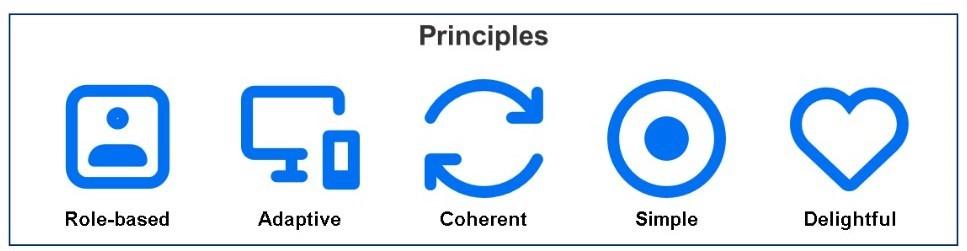
The principles are role-based, adaptive, coherent, simple, and delightful, guarantee that users receive only the information they require, on any device, with a consistent and user-friendly experience. These guidelines simplify complicated SAP transactions into easy-to-use exchanges that increase productivity and satisfaction [1].
Fiori apps are designed for particular business functions. Instead of being overloaded with features, users only see what they need to complete their jobs. Any de- vice—desktop, tablet, or smartphone—can run Fiori apps. No matter where users are, the layout automatically adapts to provide them with the same experience. Each program is made to perform a task effectively, with a clear flow and fewer clicks. Every Fiori app adheres to the same style. This makes it simpler for consumers to switch between programs by establishing a uniform appearance and feel across several operations. Fiori focuses on creating a clean, mod- ern, and enjoyable experience. It makes work less stressful and more interesting by utilizing images, incorporating insights, and intuitive layouts.
Table 1: SAP GUI vs SAP Fiori
Category | SAP GUI | SAP Fiori |
Usability | Complex, form- based, heavy menus | Modern, intuitive, role-based interface |
Deployment | Requires desktop installation | Cloud-based or onpremise, browser- accessible” |
Customization | Rigid, costly modifications | Flexible, easier to extend and configure |
Business Impact | Can be inefficient for end users | Improves productivity and decision- making |
However, rolling out Fiori across an organization requires careful planning, the right system design, and effective change management. This paper examines Fiori expansion, critical guidelines, and user perspective for implementing Fiori during an S/4HANA transition, high- lights common challenges, and offers recommendations to help companies achieve widespread adoption and realize tangible business value.
2. Industry-report studies on SAP ERP / SAP S/4HANA adoption
SAP Digital Transformation/RISE with SAP combines services, tools, and cloud ERP into a single contract. The value proposition places a strong emphasis on facilitating the transition from outdated systems to contemporary cloud-based operations more easily for businesses. Important elements include infrastructure services, process- intelligence tools, partner ecosystem support, and a cloud version of SAP S/4HANA. The model converts a larger portion of the cost from capital expenditures to operating expenditures and transfers the infrastructure and license burden to SAP (or cloud host). Scalability and flexibility are provided by RISE with SAP, enabling companies to react to shifting market conditions faster. To accelerate time-to-value for transformation projects, it incorporates embedded intelligence and per-configured industry best practices. It highlights how crucial a “clean-core” approach is to reducing customization and improving upgrade-ability over time. To increase success, users are advised to evaluate their current situation, establish a strong business case, and involve a partner as soon as possible.
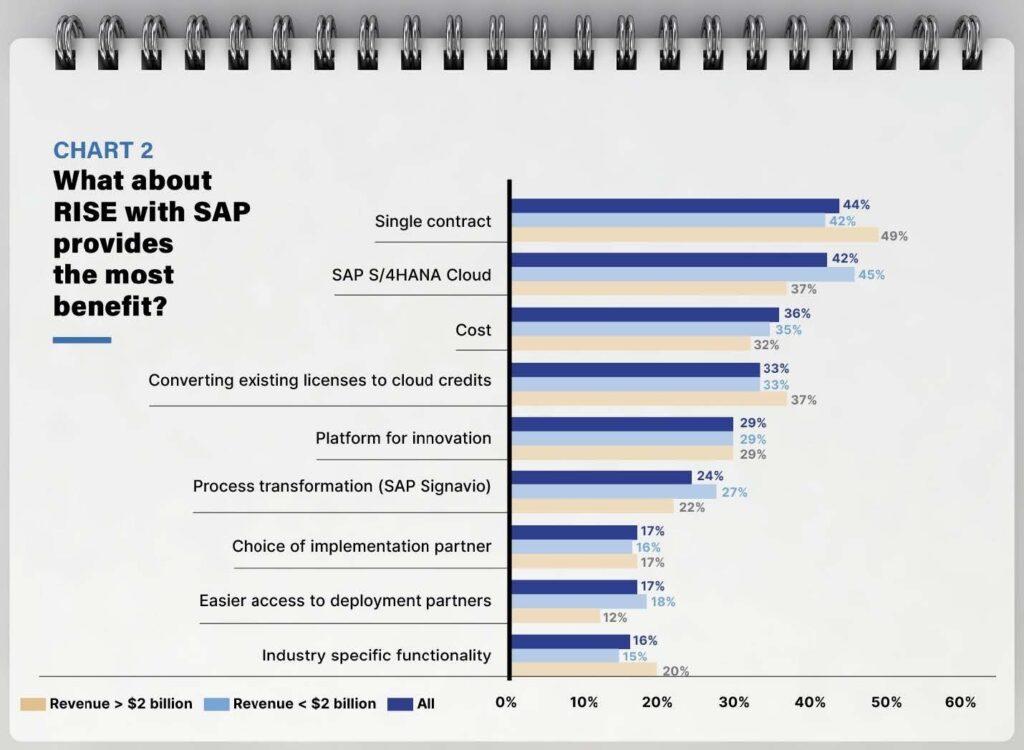
RISE with SAP provides several financial advantages, including cloud spending optimization and lower customization costs via the ERP Clean Core approach. Its scalable infrastructure helps businesses prepare for the future, and automation and streamlined operations reduce the total cost of ownership. Because of these benefits, RISE with SAP is an effective tool for long-term digital transformation and cost management [7]
3. The Strategic Role of SAP Fiori in S4 HANA
SAP Fiori is more than simply a front-end design tool — it’s a critical aspect of making S/4HANA successful. It helps companies rethink their processes, migrate to the cloud, and get their IT systems ready for the future, in addition to making the system look and feel better.
Role of User Experience in Transformation: The conventional SAP ERP interfaces (Web Dynpro, SAP GUI) were frequently criticized for being difficult to use and confusing. Fiori solves this by providing a responsive, role-based, and device-consistent user experience. Fiori speeds up end- user adoption of S/4HANA by making navigation easier and requiring less training. Simple and seamless adoption results in a higher return on investment from the move.
Adherence to SAP’s Intelligent Enterprise Strategy: By Embedding analytics directly into transactional apps, Fiori enables real-time decision-making without the need for system switches. By integrating with SAP HANA, machine learning, RPA, and conversational AI (digital assistants like Joule), Fiori becomes the gateway to intelligence within critical processes. SAP Fiori apps are built on simplified best practices, which means they focus on the most com- mon and effective ways that people do business. Fiori makes things easier for users by not giving them access to screens that are too complicated or too many customization options. This way, users can get things done quickly and consistently.
Table 2: Industry-report studies on SAP ERP / SAP S/4HANA adoption
Author , Year | Study Focus | Details |
[2], 2005 | Success/failure factors in SAP ERP implementations | Analyzes 44 SAP implementation cases and concludes that executive support, internal preparedness, strong project management, and adhering to SAP’s standard functionality are the key components of success [2]. |
[3], 2023 | ERP adoption in SMEs | This study analyzes real SME success stories and concludes that ERP greatly enhances operational performance and decision- making [3]. |
[4], 2024 | SAP S/4HANA adoption trends | Businesses are switching to SAP S/4HANA at a rapid pace, but many are encountering unexpectedly high costs, a lack of skilled workers, and delays in the migration process. Many businesses prioritize just going live first, delaying deeper strategic benefits because of integration and data-quality issues.[4] |
[5], 2023 | Optimizing SAP S/4HANA in large enterprises | It illustrates that while extensive customization raises complexity and maintenance costs, phased, cloud-based S/4HANA deployments give large businesses more flexibility and scalability.[5] |
[6], 2025 | Impact of S/4HANA Cloud on Supply Chain | Demonstrates how real-time analytics, automation, and supplier integration across logistics and procurement functions are made possible by cloud-native ERP, which greatly increases supply chain resilience [6]. |
Ensuring Strategic Fit Between Deployment Models and Business Objectives: The common user experience (UX) layer that connects everything is Fiori, regardless of whether a company uses a hybrid configuration, RISE with SAP, or GROW with SAP. In transition phases where SAP GUI, WebGUI, or custom UIs still exist, Fiori provides a bridge—ensuring consistency while legacy processes phase out.
Strategic Benefit and Market Edge: Companies can use Fiori to differentiate employee experience and operational efficiency, especially in industries like manufacturing, supply chain, and finance. By updating UX and generating momentum for extensive digital transformation initiatives, Fiori encourages stakeholders to embrace innovation be- yond ERP.5. Future-Proofing IT Landscapes. When used with RAP (RESTful ABAP Programming Model) and stan- dard apps, Fiori minimizes customizations that obstruct upgrades, thereby supporting SAP’s clean core principle. Fiori makes sure businesses are prepared for mobile-first and distributed workforce models by integrating SAP Mo- bile Start and SAP Build Work Zone. The modular design facilitates easy scaling to new applications, industries, and geographical areas in accordance with growth strategies.
After more than a decade of constant improvement, growth, and alignment with SAP’s larger Intelligent Enterprise vision, Fiori now plays a strategic role in S/4HANA. Fiori developed concurrently with SAP’s modernization of its technology stack, which included the introduction of SAP HANA, embedded analytics, mobile readiness, and cloud adoption. This journey is reviewed in the section that follows to show how Fiori’s expansion has influenced its strategic impact.
4. Evolution of SAP Fiori
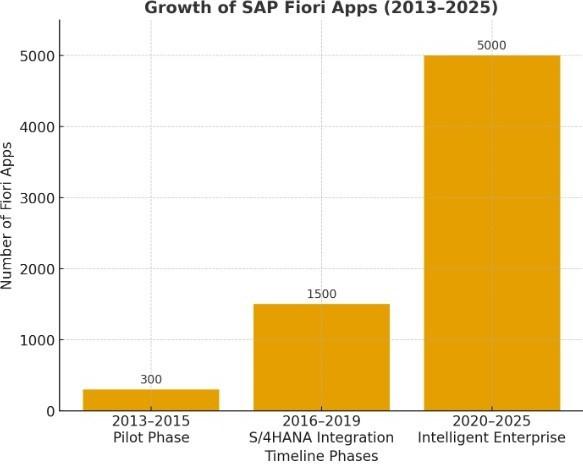
The figure 3 illustrates how quickly SAP Fiori applications are growing. This demonstrates how Fiori developed from a restricted add-on to S/4HANA and the Intelligent Enterprise standard user experience [8].
2013–2015: Pilot Phase: SAP only had a few basic apps when Fiori was introduced in 2013, and they were primarily for simple tasks like approving purchases or requesting leaves of absence. Fiori apps reached several hundred by 2015. However, because many companies still used SAP GUI and thought of Fiori as an optional feature, adoption was slow.
2016–2019: S/4HANA Integration: Following the release of SAP S/4HANA, SAP started releasing hundreds of new apps for every version of S/4HANA, and Fiori was integrated as the standard user interface. SAP also pioneered role-based design, or apps designed for specific business roles (such as “Production Planner” or “Accounts Payable Accountant”).
2020–2025: Intelligent Enterprise: The app library grew rapidly as SAP adopted its cloud-first strategy (RISE with SAP, GROW with SAP). By 2025, there are more than 5,000 standard apps, spanning almost every major business domain, including supply chain, finance, HR, analytics, procurement, and sales. Additionally, SAP unveiled Fiori Lighthouse apps, which highlight next-generation features like situation handling, predictive MRP, and embedded analytics.
Today, A large library of pre-configured Fiori apps is available to businesses deploying S/4HANA, removing the need to develop most applications from scratch. This preserves systems in accordance with SAP’s clean core methodology while also saving money and time. Over the years, Fiori has evolved into much more than apps for handling basic tasks like approvals and leave requests. It now covers complete end-to-end business processes, such as Order-to-Cash in sales or Procure-to-Pay in procurement. Because of this expansion, Fiori is now an effective instru- ment for optimizing entire organizational workflows as well as the user interface.
5. Fiori Deployment
Table 3 shows the quantitative outcomes of Fiori deployment and table 4 shows the Fiori implementation in the real world and outcomes.
Table 3: Fiori Implementation Success Metric in comparison to SAP GUI
Success Metric | Typical Improvement from Fiori implementation |
Training Efficiency | 25–40% faster learning curve [9]. |
Task Completion Time | 30–50% faster processing [10] |
Click Reduction | 40–60% fewer clicks [11] |
Rework Reduction | 15–30% reduction [12] |
Reduction in UX/UI Tickets | 130–50% fewer tickets [13] |
Mobile Usage for Approvals | Up to 50% faster approvals [14] |
ROI Timeline | 12–18 months average [15] |
6. Key Guidelines for Fiori Implementation
6.1. Showcasing the Benefits of Implementing Fiori
Objectives: Companies must evaluate the current user experience before deploying SAP Fiori to identify what works well, what aggravates users, and which processes are complex. Instead of generic transactions, the emphasis should be on business roles (accountant, sales representative, procurement clerk). In ECC, to create and monitor orders, a sales representative may need to use VA01, VA05, and VA06 separately. By defining a UX objective to “reduce the number of clicks to manage sales orders,” the business can justify the release of the “Manage Sales Orders” Fiori app, which incorporates all features.
Tools: (1) SAP Fiori Reference Library: is a comprehensive catalog where you can search through all of the Fiori apps that are available and determine which ones are appropriate for particular business roles [8]. (2) SAP Process Discovery & Signavio Insights: These tools help businesses find bottleneck areas or gaps in their current processes and then suggest Fiori apps that could make those processes faster and easier [21]. (3) SAP Fiori Lighthouse Apps: These are SAP’s “flagship” apps, showcasing the newest features, such as AI, built-in analytics, and innovations exclusive to S/4HANA. They are intended to serve as illustrations of Fiori’s strength.
Value: To convince users and gain the support of leaders, it is essential to show quick results. Early successes prove that Fiori isn’t just a new look for SAP, but actually helps people work faster and more efficiently. In a procurement pilot, the “My Inbox” Fiori app processed purchase requisition approvals 40% faster than the SAP GUI. Leaders felt confident enough to extend the rollout to other departments because of this quantifiable improvement.
6.2. Roll-Out and Change Manage
Organizations should roll out Fiori apps role-by-role rather than all at once like. A company might first roll out Fiori to the procurement team, giving them access to “Manage Purchase Orders” and “Monitor Supplier Confirmations.” Once they are comfortable, the rollout extends to finance with “Manage Journal Entries” and “Cash Flow Analyzer.” This phased approach prevents overloading users and IT support.
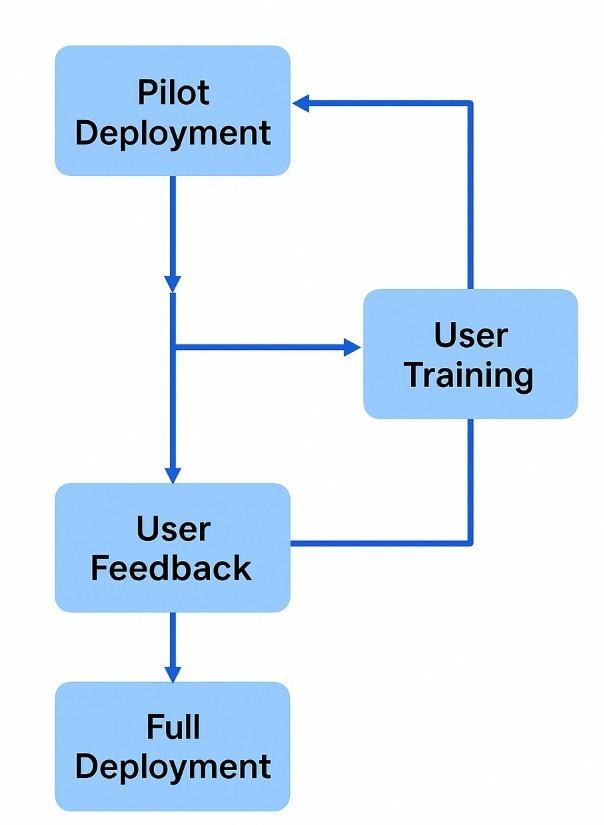
Even though Fiori simplifies processes, any changes made to the workflow or user interface could cause problems. Employees may be resistant to change. To overcome this, organizations need to invest in training, demos, and digital assistance tools. When a sales department moved from SAP GUI’s VA05 (sales order list) to the “Manage Sales Orders” Fiori app, users initially resisted but were able to adapt with the help of quick demo sessions and in-app tooltips that showed how the new app provided integrated analytics and simplified processes.
Fiori offers users to customize the experience to suit their everyday needs with Fiori’s personalization features, which include filters, saved views, “My Home” dashboards, and spaces/pages. The “Display Supplier Invoices” app allows an accounts payable clerk to set default filters that will always display open invoices that exceed a specific
Table 4: Fiori Implementation Benefits in the Real World
S. No. | Industry Study | Key Outcome |
1 | Automotive – Custom Fiori Apps by Innowise for an automotive manufacturer | Innowise built a suite of custom Fiori/UI5 apps for materials & asset management within the client’s S/4HANA environment—tile dashboards, real-time KPIs, supplier scoring. Result: 2.3× reduction in risk of supply disruptions, and measurable procurement process improvements [16]. |
2 | Aerospace – Quality Management Transformation using Fiori by HCL Technologies | Global aerospace manufacturer implemented a Fiori-based digital quality management solution across 30+ systems, improving turnaround time and reducing backlog. Key metrics: $38 M savings, 90% backlog reduction, 60% efficiency gain, 75% fewer clicks, 40% fewer manual steps [17]. |
3 | Manufacturing /Logistics – Inventory Management Fiori Project by CBS Consulting | A project covering three key inventory management Fiori apps across multiple industries (retail, discrete manufacturing, logistics) helped reduce over-/under-stocking, improved forecasting, and stock visibility [18]. |
4 | Manufacturing – Deploy- ment Study of Fiori/UI5 in S/4HANA | Empirical study of a multi-national manufacturing organization’s Fiori/UI5 deployment: cited metrics like 38% increase in task-completion rate, 43% better accuracy on tablets, 62% reduction in deployment prep time, 41% shorter deploy execution time [19]. |
5 | Logistics – Improved Real-Time Visibility using S/4HANA (Fiori as front-end) in logistics operations | reductions in lead-time 27.8–38%, operational cost savings 33–47%, supply chain efficiency increase 27–39% by leveraging S/4HANA + Fiori for real-time visibility and process automation [20]. |
threshold [22].
6.3. Use Design Strategy
The dedicated UX Lead can act as a point of contact for technical teams (developers, architects) and business stakeholders (end users, process owners. The UX Lead collaborated with production planners to simplify the Fiori launchpad during a manufacturing rollout, reducing it to only four essential apps: Manage Work Orders, Monitor Work Center Schedules, Confirm Operations, and Material Coverage. This prevented planners from getting flooded with unnecessary apps.
UX design cannot be isolated. To guarantee the design satisfies security, performance, and business process requirements, the UX coordinates with enterprise architects, security specialists, analytics experts, and functional consultants. When rolling out “Manage Supplier Invoices,” the UX team should work with the security lead to define role-based authorizations so that clerks, managers, and auditors each see different views of the same app.
The launchpad is the entry point for all apps. The launchpad design should prioritize spaces and pages, role- based access, and simplicity. For “Store Managers,” “Ware- house Supervisors,” and “Finance Controllers,” a multinational retail corporation must establish distinct launchpad spaces. Only the apps and KPIs that are relevant to each role will be visible.
Fiori apps should be straightforward, role-based, and responsive [23]. The application of these principles must be continuously guaranteed by the UX Lead. To cut down on errors and data entry time, the UX team will design a simplified “Create Purchase Order” application that only displays the most used fields by default, rather than copying ECC’s ME21N with all fields.
The UX Lead is responsible for ensuring that apps are tested with actual users, collecting feedback, and gradually improving the design. This lowers resistance and ensures that the solution meets the needs of the real user.
6.4. Architecture
Deployment Models: SAP suggests using SAP Build Work Zone (standard edition) together with SAP Mobile Start for complex, hybrid, or multi-cloud environments. This offers a single point of access for apps on various systems, including on-premises and cloud-based ones. A multinational enterprise with S/4HANA Cloud (for fi- nance) and on-premise S/4HANA (for manufacturing) used SAP Build Work Zone to provide employees with a single unified Fiori Launchpad, avoiding confusion from logging into different systems separately.
6.4.1. On-Premise Cloud
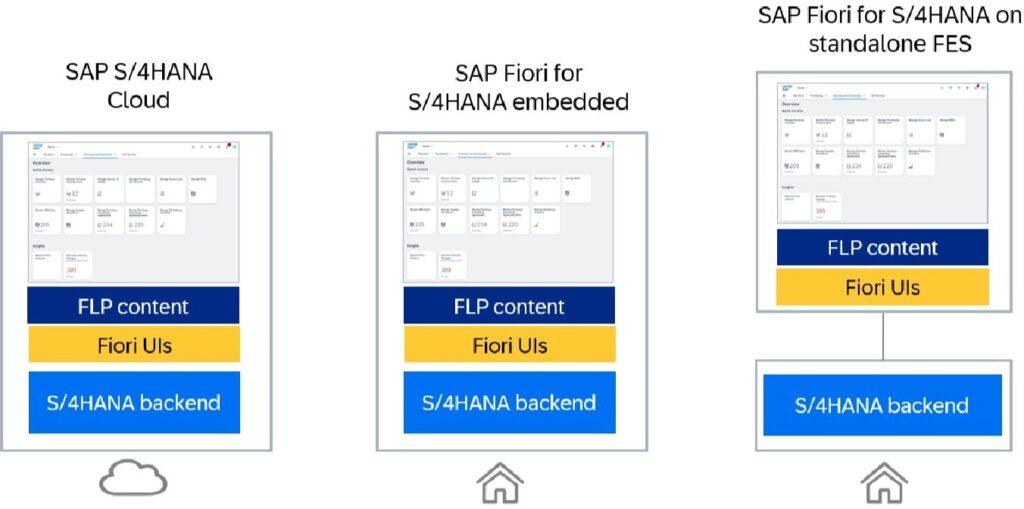
SAP S/4HANA Cloud: Fiori is integrated into the system by default; SAP updates the Launchpad, apps, and backend automatically. A standardized, clean-core user experience, rapid innovation, and minimal maintenance work are all guaranteed by this model [24]. Fiori comes pre-installed in both public and private cloud versions of S/4HANA. Businesses only need to set up role-based catalogs and groups in the Fiori Launchpad to ensure that each user sees the appropriate apps for their job, eliminating the need to install additional servers [25].
SAP Fiori for S/4HANA Embedded (On-Premise ): The S/4HANA system includes the Fiori frontend server, UI applications, and backend services, resulting in a highly integrated and efficient environment. Because it simplifies lifecycle management and lowers complexity, SAP recommends it to customers using private clouds and on-premises systems [24].
SAP Fiori for S/4HANA on Standalone FES( Hub Deployment ): Multi-backend landscapes are supported by the Fiori frontend server, which is located on a different system and connects to the S/4 backend remotely. SAP now only suggests it in exceptional circumstances because it adds additional maintenance and synchronization work [24].
Since Fiori apps are accessed through mobile devices and web browsers, a strong security design is essential. Secure access via VPN, reverse proxy, or SAP Web Dispatcher is needed for external users. A sales manager logs in from a hotel using a tablet. The connection goes through a reverse proxy, which checks identity and routes traffic securely to the Fiori front end. Network-level firewalls must protect the OData communication between the Fiori front-end and back-end. A maintenance technician using the “Manage Work Orders” app sends data back to the ERP system. Firewalls and secure gateways make sure that the request isn’t hijacked or redirected by malicious actors. SAP Fiori uses catalogs and business roles to ensure users only see and access apps relevant to their job. This improves security while also making the user experience easier. A finance controller shall see apps related to cash flow and journal entries, while a procurement clerk shall only see apps like “Approve Purchase Orders” and “Manage Purchase Requisitions.”
6.5. Performance and Support
Performance and usability bottlenecks tend to occur in Fiori implementations.
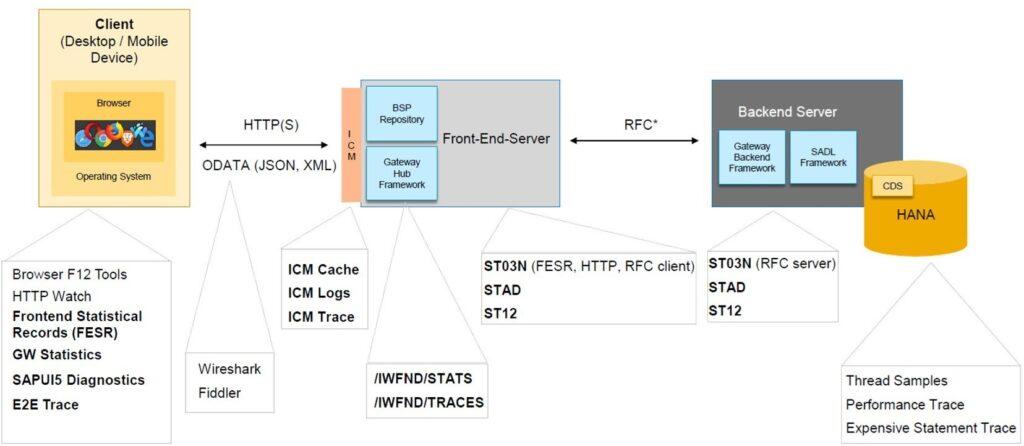
Sometimes Fiori pages or tiles may load slowly or appear in error. This can happen because of browser caching problems, a slow network connection, or a front-end server that isn’t set up properly. Users log in but don’t see required apps because of incomplete role assignments or missing catalogs in the Fiori launchpad. OData and CDS views are essential to Fiori apps. Apps won’t load data if these aren’t activated in the back-end system. Even if the app tile appears, users may get “not authorized” errors because back-end roles (authorization objects) are not aligned with Fiori roles [26].
The figure 6 shows the flow of end-to-end performance tracing and tools in the SAP Fiori environment, from the client (browser/device) to the backend server (ABAP + HANA) via the Gateway Hub front-end server [27].
Organizations should implement structured monitoring and diagnostic processes to prevent bottlenecks using the above tools. Organizations can also support a model with three tiers: Level 1: cache clearing and other basic troubleshooting, Level 2 :(role/authorization fixes), and Level 3: backend/CDS debugging. Promote a knowledge base that includes frequently asked questions and solutions to common problems.
6.6. Development
SAP has provided over 5,000 standard Fiori apps that cover essential business processes. Before creating custom apps, the best thing is to reuse and modify pre-existing standard apps. These can be modified through side-by-side BTP extensions or in-app extensibility (custom fields, app variations, UI personalization). This minimizes technical debt, cuts down on development effort, and adheres to SAP’s clean core principle of guaranteeing upgrade safety.
- Flexible
Teams has to choose between Fiori Elements (template- based apps) or SAPUI5 freestyle apps for flexibility. Developers can use the Flexible Programming Model to combine both strategies, starting with a Fiori Elements template and adding freestyle UI5 coding where necessary to meet specific business needs [28].
It is essential to start with SAP Fiori Design Guidelines, involve end-users early, build prototypes, and test usability before coding.
6.7. Skill Building
Organizations need to establish a culture of ongoing learning among developers, business analysts, administrators, and even end users in order to successfully deploy Fiori. SAP offers a variety of structured learning resources to help with this:
- SAP Tutorials → Short technical exercises on UI5, OData, and RAP [29].
- openSAP Courses → Free, instructor-led MOOCs [30].
- SAP Learning Journeys → Structured role based paths [31].
- Bootcamps → Hands-on, fast-track
SAP is incorporating generative AI into its products, including SAP Business Application Studio (pro-code) and SAP Build (low-code). This speeds up testing, documentation, and development.
7. Core Difficulties and Risks in Transitioning to Fiori
Businesses underestimate the amount of training required, and ABAP developers are not familiar with Fiori design principles, RAP (RESTful ABAP Programming Model), JavaScript, OData, CDS, and SAPUI5 technologies. If teams are not adequately trained, projects will experience delays, poor apps, and usability problems.
Many organizations top executives and decision-makers still view SAP Fiori as a “nice-to-have” upgrade rather than a critical strategic tool. Management needs to understand that it is a strategic tool for increased output, optimized workflows, and enhanced user satisfaction. They need to be convinced of Fiori’s observable business benefits, such as role-based dashboards that facilitate improved decision-making and real-time analytics.
The Power users have decades of experience with SAP GUI. They perceive transaction codes as quick and effective since they are memorized. To attract power users, Fiori’s capacity to combine multiple tasks and processes into a single, simple dashboard could be emphasized. With its role-based apps and new navigation, moving to SAP Fiori frequently feels like a slowdown. Users may avoid Fiori and stick with the GUI if resistance is not controlled, which would weaken the case for S/4HANA transformation.
Businesses frequently rely extensively on customized applications made to function with the SAP GUI. When contemplating the switch to the Fiori UI, these specialized applications may be significant challenges. Businesses should consider moving their custom solutions to Fiori as a crucial component of implementing S/4HANA. Post- implementation, to find any problems or possible areas for further improvement, a thorough review should be conducted.
Fiori applications rely on browser rendering, CDS views, and OData services. Performance may deteriorate in the absence of appropriate OData activation, HANA indexing, and caching techniques. Slow apps are frequently viewed There’s a common belief that Fiori does not have enough apps to cover all the processes, which can be a reasonable complaint in some cases. At the time of writing, the num- ber on the Fiori App Library was 17127, and it continues to rise. Businesses can find or create suitable Fiori apps and identify their specific app needs with the help of a thorough investigation [32].
8. Stakeholder Perspective in Strategic Transformation
Fiori is a crucial facilitator of digital transformation for business leaders. Fiori helps businesses increase produc- tivity, enhance decision-making, and maximize return on investment from their S/4HANA investments by simpli- fying complicated ERP processes and integrating clever features.
IT architects must consider system scalability, security, and mobile readiness in order to implement Fiori. Role- based access, remote work without performance issues, and hybrid landscapes must all be supported by the ar- chitecture. Selecting the appropriate deployment model (embedded front-end vs. Work Zone for hybrid) is one of the architects top priorities.
Fiori changes the way end users interact with SAP. They receive role-based apps, customized launchpads, and integrated analytics in place of learning transaction codes and navigating complex interfaces. This facilitates data-driven decision-making within processes, lowers errors, and saves time for end users [33].
9. Continuous Improvement Methodology Post- Deployment
Ongoing monitoring mechanisms: After deployment, organizations need to set up a baseline understanding of system performance and user behavior, which includes usage analytics, error logs, user-experience surveys, and support-ticket analysis. These insights show where users have trouble, which apps fail to function effectively, and where there are potential chances to improve the interface, automate tasks, or change processes.
Iterative enhancement cycle: Adopting Agile sprints or the PDCA model (Plan–Do–Check–Act) is a crucial best practice. This model identifies opportunities for improvement, prioritizes them according to their potential impact, and then implements them in manageable, small phases. Screen simplification, navigation optimization, value-help options improvement, click path reduction, and the intro- duction of new Fiori features that are compatible with user requirements are a few examples of enhancements. Every improvement is tested on a few users, evaluated against predetermined KPIs, and only broadened once successful outcomes have been confirmed. This maximizes value and reduces disturbance.
User feedback loop: Users frequently find real-world bottlenecks after go-live that weren’t visible during testing. Regularly conducting usability tests, in-app surveys, and user interviews ensures that these insights are recorded and promptly implemented. Organizations can continuously adjust Fiori applications to match how work is actually done on the ground by combining them with analytics data, such as heat maps, click-tracking, and workflow cycle times.
Governance and knowledge enablement: Keeping role-based guides, training materials, and documentation up to date guarantees that users maintain their confidence as improvements are implemented. To review KPIs, approve changes, track technical performance, and ensure alignment with SAP clean-core principles and UX standards, a cross-functional governance team is needed on a regular basis.
10. Fiori integration with AI recommendations
Future studies can examine how SAP Fiori develops as a strategic interface for AI-powered business systems, progressing from usability improvements to intelligent, self- governing processes. Researchers can investigate how generative AI, explainable AI, conversational AI, and predictive analytics influence user decision-making, task automation, and cognitive load by expanding Fiori’s integration with AI. Research can also analyze how Fiori can serve as a central hub for AI-assisted process intelligence, enabling organizations to leverage machine learning insights directly within user-facing applications. Sustainability is another important area, where Fiori may be essential in providing real-time visualizations of carbon footprints, circular economy data, and ESG metrics. Research may look into how Fiori interfaces can encourage users to make more environmentally friendly decisions and help ensure sustainability reporting complies with regulations. Furthermore, studies can look at how AI and Fiori work together to support the workforce of the future, especially in remote or hybrid settings. This includes AI-guided workflows, reskilling dashboards, personalized onboarding pathways, and adaptive learning interfaces that help frontline employees complete complex tasks more quickly. The potential of Fiori applications to improve human-AI cooperation, guarantee transparency, reduce bias, and increase confidence in AI-driven judgments is also worth investigating. Future research might suggest frameworks that specify the skills digital workers require to successfully use AI-augmented Fiori systems. Scholars can also create adoption roadmaps or maturity models to assist organizations in moving from traditional Fiori deployments to workforce-focused, intelligent, and sustainable UX ecosystems backed by SAP BTP and S/4HANA [34].
11. Conclusion
SAP Fiori is crucial to the success of SAP S/4HANA as it influences how users engage with business processes daily. Businesses that view Fiori adoption as a strategic shift rather than a cosmetic UI update can increase productivity, scalability, and return on investment. By providing role-based workflows, embedded analytics, and cloud readiness, Fiori goes beyond visual redesign and positions companies for long-term success by coordinating with SAP’s clean core and cloud-first strategy. To optimize value, businesses should implement guidelines like Objective finding, which links UX pain points to quantifiable business outcomes; Change Management, which applies phased rollouts and training to minimize resistance; UX leadership, which ensures consistent design standards and simple usability; employing proactive monitoring and diagnostics for performance and support; adhering to the adaption of SAP standard apps before custom apps in development to maintain clean core alignment and using learning platforms and AI tools for skill building to fill in knowledge gaps. Businesses that take a strategic approach, paying close attention to business procedures, user needs, and change management, can gain a substantial competitive edge. Those who view it as a technical add-on often have trouble and don’t get much from S/4HANA investments. Also, when Fiori and AI are combined, the system can become a smart assistant that helps users, provides insightful information, and speeds up and simplifies tasks. This potent combination can assist companies in making better decisions and expanding in a more meaningful and healthful manner when used sensibly while keeping people in mind. Fiori ultimately acts as the gateway to the Intelligent Enterprise, assisting businesses in modernizing their ERP, empowering staff, simplifying processes, and cherishing ongoing innovation in the digital world.
- A. Yadav, “Uxp100 – sap fiori overview”, https: //www.academia.edu/32436142/UXP100_SAP_Fiori_Overview, 2025.
- V. B. Gargeya, C. Brady, “Success and failure factors of adopting sap in erp system implementation”, Business Process Management Journal, vol. 11, pp. 501–516, 2005, doi:10.1108/14637150510619858.
- A. Gessa, A. Jiménez, P. Sancha, “Exploring erp systems adoption in challenging times. insights of smes stories”, Technological Forecasting and Social Change, vol. 195, 2023, doi:10.1016/j.techfore.2023.122795.
- SAP, “The state of sap s/4hana adoption: Trends, successes, and challenges”, https://www.asug.com/insights/the-state-of-sap-s-4hana-adoption-trends-successes-and-challenges, 2025.
- A. Mangal, P. Gupta, O. Goel, “Comparative analysis of optimizing sap s/4hana in large enterprises”, SSRN Electronic Journal, 2024, doi:10.2139/ssrn.4985357.
- “Cloud-first supply chains: The impact of sap s/4hana cloud on logistics and procurement”, Global Journal of Engineering and Technology Advances, vol. 24, pp. 206–217, 2025, doi:10.30574/gjeta.2025.24.1.0221.
- SAP, “Financial benefits of rise with sap”, https://www.protera.com/resource-center/financial-benefits-of-rise-with-sap, 2025.
- SAP, “Welcome to the sap fiori apps reference library!”, https://fioriappslibrary.hana.ondemand.com/sap/fix/externalViewer/, 2025.
- SAP, “Sap design system”, https://www.sap.com/design-system/, 2025.
- SAP, “How to successfully adopt sap fiori in sap s/4hana”, https://ktern.com/article/how-to-successfully-adopt-sapfiori-
in-sap-s-4hana/, 2022. - SAP, “Sap fiori – introduction, features, history and benefits – geeksforgeeks”,
https://www.geeksforgeeks.org/business-studies/sap-fiori-introduction-features-history-and-benefits/,2025. - S. Ganipaneni, M. M. K. Dandu, R. K. Kolli, D. S. P. Singh, O. G. D. P. Goel, I. editor cheif, IJCSPUB, “Automation in sap business processes using fiori and ui5 applications”, https://rjpn.org/ ijcspub/viewpaperforall.php?paperIJCSP24A1160, 2024.
- SAP, “Sap fiori for web”, https://www.sap.com/design-system/fiori-design-web/, 2025.
- SAP, “Sap fiori | user experience and apps”, https://www.sap.com/products/technology-platform/fiori.html, 2025.
- SAP, “Sap cloud erp”, https://www.sap.com/products/erp/s4hana.html, 2025.
- SAP, “Sap fiori app development | innowise case study”, https: //innowise.com/case/sap-fiori-app-development/, 2025.
- SAP, “Aerospace leader improves quality with sap fiori| hcltech”, https://www.hcltech.com/case-study/aerospaceleader-improves-quality-with-sap-fiori, 2025.
- Varine, “Optimising your inventory management with proven sap fiori application uses cases”, https://www.cbs-consulting.com/en/optimising-your-inventory-management-with-provensap-fiori-application-uses-cases/, 2023.
- S. K. Mourya, “The evolution and implementation of sap fiori ui5 in s/4hana environments”, European Journal of Computer Science and Information Technology, vol. 13, pp. 80–90, 2025, doi:10.37745/ejcsit.2013/vol13n278090.
- S. K. Mourya, “The evolution and implementation of sap fiori ui5 in s/4hana environments”, European Journal of Computer Science and Information Technology, vol. 13, pp. 80–90, 2025, doi:10.37745/ejcsit.2013/vol13n278090.
- G. McCool@,N. Singh, “Introducing business process transformation with sap ® signavio ® sap press e-bites”, www.sap-press.com/4998, 2025.
- J. Dart, “Sap fiori for sap s/4hana – upgrade faster: Managing app lifecycle impacts on users”, https://community.sap.com/t5/enterprise-resource-planning-blog-posts-by-sap/sapfiori-for-sap-s-4hana-upgrade-faster-managing-applifecycle-impacts-on/ba-p/13626216, 2024.
- SAP, “Sap design system”, https://www.sap.com/design-system/, 2025.
- SAP, “Sap fiori deployment options and system landscape recommendations”, https://www.sap.com/documents/2018/02/f0148939-f27c-0010-82c7-eda71af511fa.html, 2018.
- SAP, “Discover sap fiori”, https://help.sap.com/docs/SAP_FIORI_OVERVIEW/f42cbf488a3c4f18a570b20c57b77cfa/4d0feecb64fe49ccbe45c3361e71b7c4.html?version5_OVERVIEW, 2025.
- SAP, “Sap fiori lighthouse apps”, https://www.sap.com/documents/2018/01/12b3dec4-ec7c-0010-82c7-eda71af511fa.html, 2018.
- L. Le, “Tamas szirtes, aviad rivl in implementing sap fiori® launchpad rheinwerk® publishing bonn • boston”,
https://www.academia.edu/40150263/Tamas_Szirtes_Aviad_Rivl_in_Implementing_SAP_Fiori_Launchpad_Rheinwerk_
Publishing_Bonn_Boston?utm_sourcechatgpt.com, 2016. - SAP, “Explaining side-by-side extensibility”, https: //learning.sap.com/courses/getting-started-with-in-appextensibility-in-sap-s-4hana/explaining-side-by-sideextensibility_d0fbc6b1-cb98-4c00-8b34-e80bbe6bf7f2, 2025, accessed 2025.
- SAP, “Sap tutorial navigator | tutorials for sap developers”, https: //developers.sap.com/tutorial-navigator..html, 2018.
- SAP, “Developing and extending sap fiori elements apps”, https://learning.sap.com/courses/developing-andextending-sap-fiori-elements-apps, 2025.
- SAP, “Introducing sap fiori”, https://learning.sap.com/courses/learning-the-basics-of-sap fiori/introducing-sap-fiori_c3915ced-ffd1-4127-a822-e217ff45fd72, 2025.
- SAP, “5 major hurdles and solutions in adopting sap fiori after s/4hana implementation”, https://www.linkedin.com/pulse/5-
major-hurdles-solutions-adopting-sap-fiori-after-2ozkf/, 2020. - SAP, “Essentials of sap fiori: Bridging business, technical, and user perspectives”, https://www.linkedin.com/pulse/essentials-sap-fiori-bridging-business-technical-userjeevan-koneti-iglrc/, 2025.
- S. Sirse, “Sap: Fiori application and its integration with ai”, International Journal for Research in Applied Science and Engineering Technology, vol. 12, pp. 1437–1442, 2024, doi:10.22214/ijraset.2024.5858